Your AI Chatbot That Already Knows Everything About Your WordPress, PrestaShop, or Joomla Site — No Configuration Required

Installing an intelligent chatbot on your e-commerce site or blog has never been easier. Discover how to connect your CMS in 3 clicks and let artificial intelligence automatically learn all your content.
Why Install an AI Chatbot on Your Website in 2026?
Your visitors want instant answers. Whether it's a PrestaShop online store, a WordPress site, or a Joomla portal, internet users no longer have the patience to search for information. They ask a question, they want an answer. Now.
A well-configured AI chatbot transforms your visitors' experience. It answers frequently asked questions about your products, guides hesitant buyers, and frees your team from repetitive requests. The problem until now? Configuring a truly intelligent chatbot required time, technical skills, and a lot of patience.
You typically had to copy API keys, install complex plugins, then spend hours "training" the chatbot by manually teaching it every piece of information about your business, your products, your services.
Result: many gave up along the way, or ended up with a basic chatbot incapable of correctly answering their customers' real questions.
That's exactly the problem we wanted to solve.
Discover our specific solutions:
- WordPress & WooCommerce - 5-minute installation
- PrestaShop - Complete e-commerce support
- Joomla & HikaShop - Automatic synchronization
The New AI SmartTalk Integration for WordPress, PrestaShop, and Joomla
We've completely rethought how a chatbot connects to your site. Our goal was simple: anyone, even without any technical skills, should be able to install a high-performance AI chatbot in less than 5 minutes.
Here's how it works now.
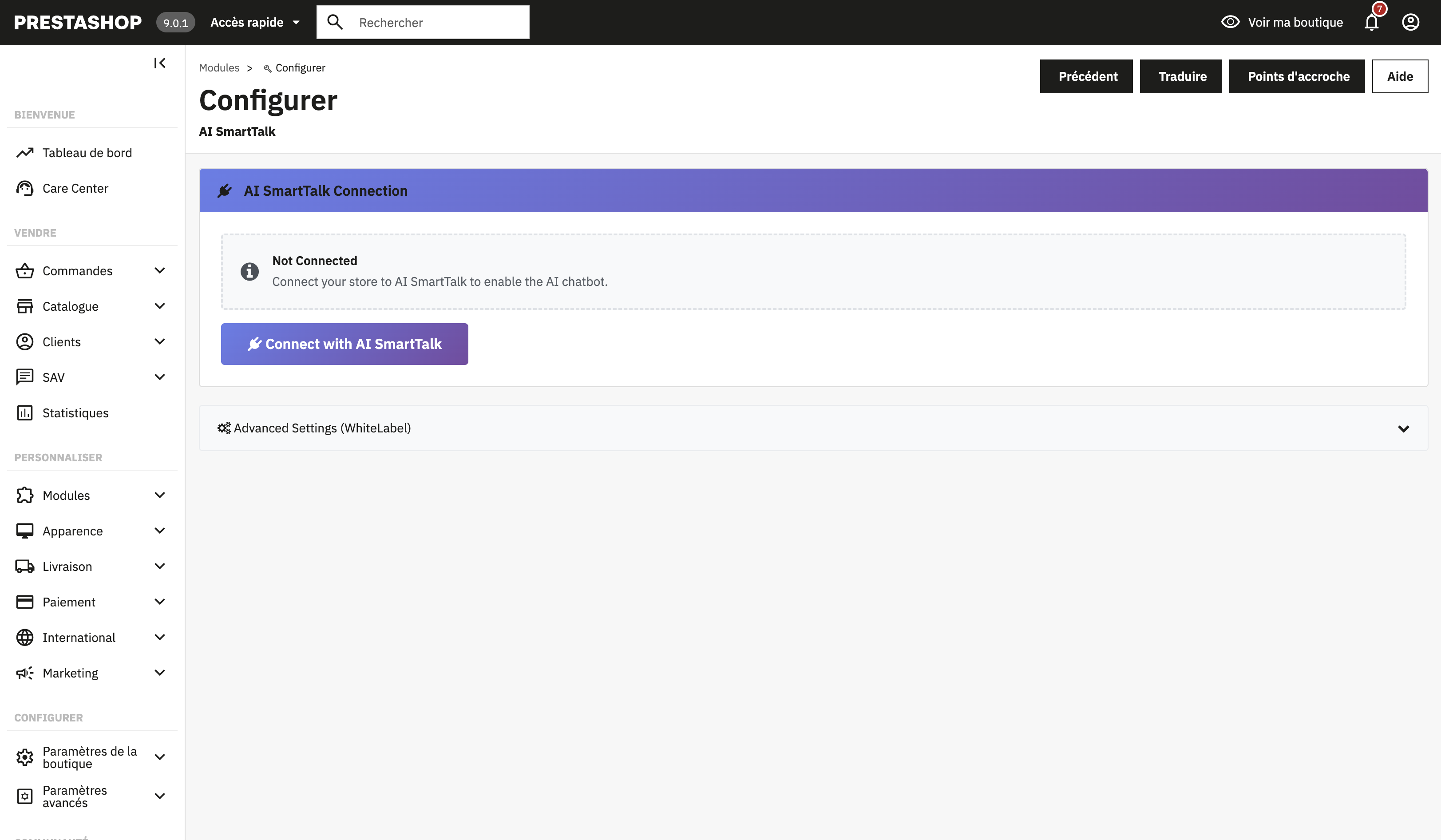 Connect your CMS to AI SmartTalk in 3 clicks with our secure OAuth system.
Secure Connection in 3 Clicks
Forget copying and pasting API keys, modifying configuration files, or 45-minute YouTube tutorials.
With our new authentication system, you connect your CMS site to AI SmartTalk in exactly 3 clicks:
- You install our plugin on your CMS
- You click "Connect to AI SmartTalk"
- The secure connection is established automatically
The connection uses our internally developed OAuth authentication system. This means your credentials never pass through an external service. The connection is direct between your site and AI SmartTalk, encrypted, and you can revoke it at any time.
Artificial Intelligence Automatically Learns Your Content
This is where the magic happens. Once the connection is established, your chatbot doesn't remain an empty shell waiting for you to teach it everything.
It will automatically explore and learn:
On WordPress:
- All your published pages
- All your blog posts
- Your WooCommerce products (if you have a store)
- Your categories and tags
- Your existing FAQs
💡 For e-commerce stores: Discover all e-commerce features in our dedicated e-commerce guide or the WordPress & WooCommerce page.
On PrestaShop:
- Your complete product catalog
- Detailed descriptions of each item
- Your categories and subcategories
- Shipping and return information
- Your CMS pages (legal notices, about, etc.)
🛒 Discover PrestaShop: Check out the complete PrestaShop page with all multi-language e-commerce features.
On Joomla:
- All your published articles
- Your content pages
- Your category structure
- Your custom content modules
- Your HikaShop products (if you use HikaShop)
🌐 Discover Joomla: Explore all features on the Joomla & HikaShop page.
The chatbot indexes all this content and becomes able to reference it naturally in conversations with your visitors.
What Does This Actually Change for You?
Before: Hours of Manual Configuration
Imagine you have a PrestaShop store with 300 products. With traditional solutions, you had to:
- Export your products to a CSV file
- Format that file according to the chatbot's requirements
- Import it into the platform
- Verify that everything went well
- Start over every time you add or modify a product
Not to mention the frequently asked questions the chatbot couldn't answer because the information was on a page you forgot to import.
Now: 3 Clicks and It's Online
You connect your site, the chatbot learns on its own, and it updates automatically when you modify your content.
You add a new product on PrestaShop? The chatbot knows it. You publish a blog post on WordPress? It can talk about it. You update your shipping terms on Joomla? It gives the correct information.
No more gap between what's on your site and what your chatbot knows.
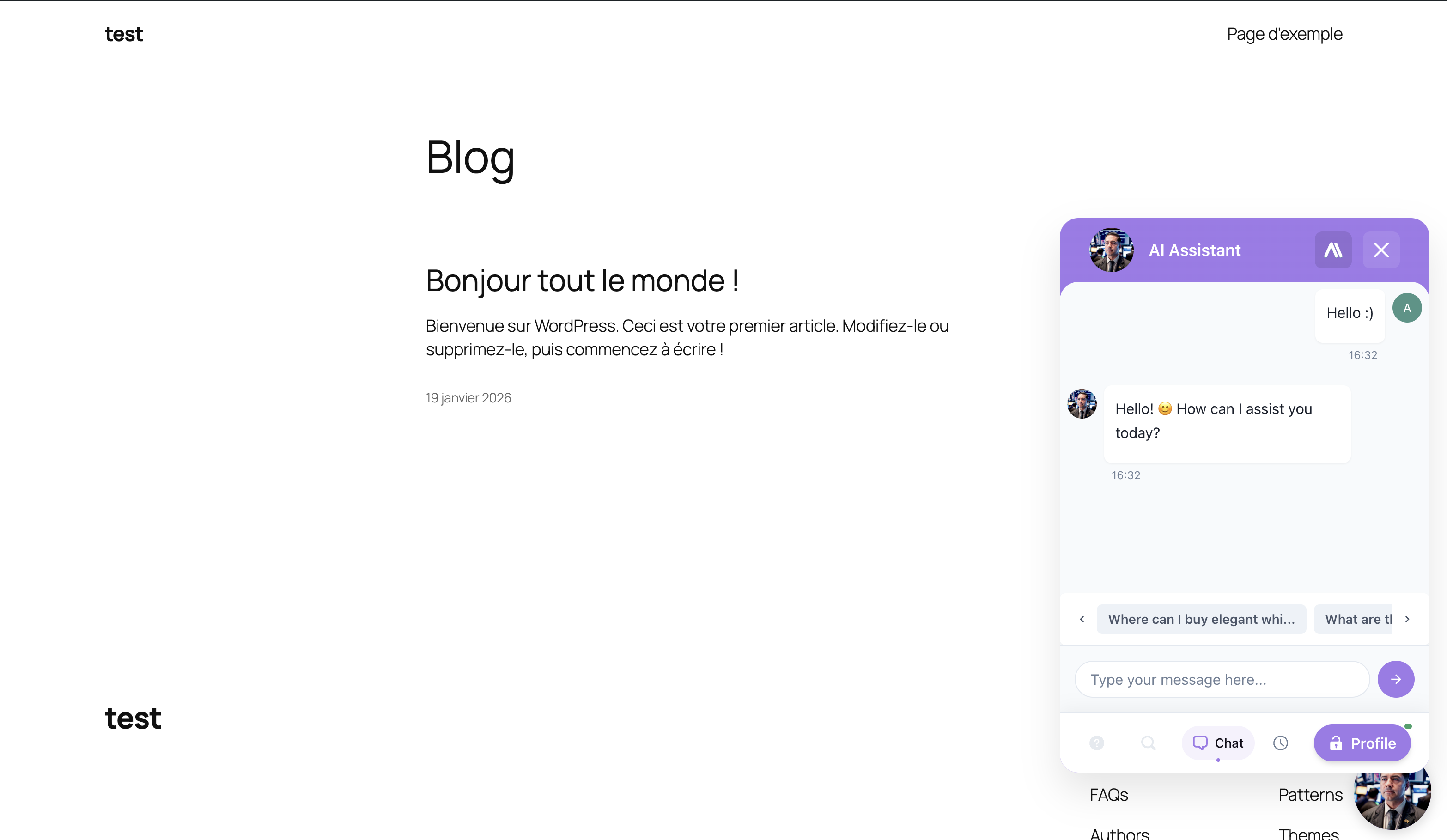 Your chatbot is now online and answering your visitors' questions.
Discover the complete features:
- WordPress & WooCommerce - All Features
- PrestaShop - Multi-language Support
- Joomla & HikaShop - Automatic Synchronization
Security at the Heart of Integration
We know that connecting an external service to your site can be scary. It's your business, your customer data, your reputation.
That's why we developed our own authentication system rather than going through a third-party service.
How Does Our In-House OAuth Work?
OAuth is a standard protocol that allows two services to communicate securely without sharing passwords. When you use "Sign in with Google" on a site, that's OAuth.
Our implementation works on the same principle, but directly between your CMS and AI SmartTalk:
- No intermediary: your data never passes through any third-party service
- Encrypted connection: all communications use HTTPS
- Limited permissions: the chatbot accesses only the public content of your site, never sensitive data
- Revocable at any time: you can cut the connection with one click from your dashboard
What Can the Chatbot See on Your Site?
Only public content. That is, the information that any visitor to your site can already see:
- Published pages
- Blog posts
- Product pages
- Categories
The chatbot does not have access to:
- Your customer data
- Orders
- Payment information
- Your admin panel
- Draft or private content
Wéi Dir de Chatbot an Ärem CMS an 5 Minutten installéiert
Hei ass de komplette Prozess, Schrëtt fir Schrëtt.
Schrëtt 1: Kreéiert Ären AI SmartTalk Kont
Wann Dir nach net gemaach hutt, mellt Iech gratis un bei AI SmartTalk. D'Registréierung dauert 30 Sekonnen an erfuerdert keng Kreditkaart.
Schrëtt 2: Fannt d'Integratioun fir Äert CMS
An Ärem Dashboard, benotzt d'Fuerschbar an tippt einfach "WordPress", "PrestaShop" oder "Joomla". Dir kënnt direkt op d'entspriechend Integratiounsseite kommen. Dir kënnt och eis detailléiert Guiden konsultéieren:
Schrëtt 3: Lued de Plugin erof an installéiert et
Vun dëser Säit, lued de Plugin fir Äert CMS erof. Installéiert et wéi all Erweiderung:
Op WordPress: Plugins > Neie bäifügen > Plugin eropluede, dann aktivéieren
Op PrestaShop: Moduler > Modul Manager > Installéieren
Op Joomla: Erweiderungen > Installéieren
Eis Plugins ginn och an de offiziellen Geschäfter vun all Plattform verëffentlecht. An e puer Deeg kënnt Dir se direkt aus de WordPress, PrestaShop, an Joomla Erweiderungskataloge installéieren, ouni iwwer AI SmartTalk ze goen.
Fir all spezifesch Funktiounen fir all CMS ze entdecken:
- WordPress & WooCommerce Chatbot - Komplett Funktiounen
- PrestaShop Chatbot - Multi-sproocheg E-Commerce
- Joomla & HikaShop Chatbot - Automatesch Synchronisatioun
Schrëtt 4: Autoriséiert d'Verbinding
Soubal de Plugin aktivéiert ass, klickt op "Verbannen mat AI SmartTalk". D'sécher Verbindung gëtt automatesch etabléiert an Är Inhalter Synchronisatioun fänkt un.
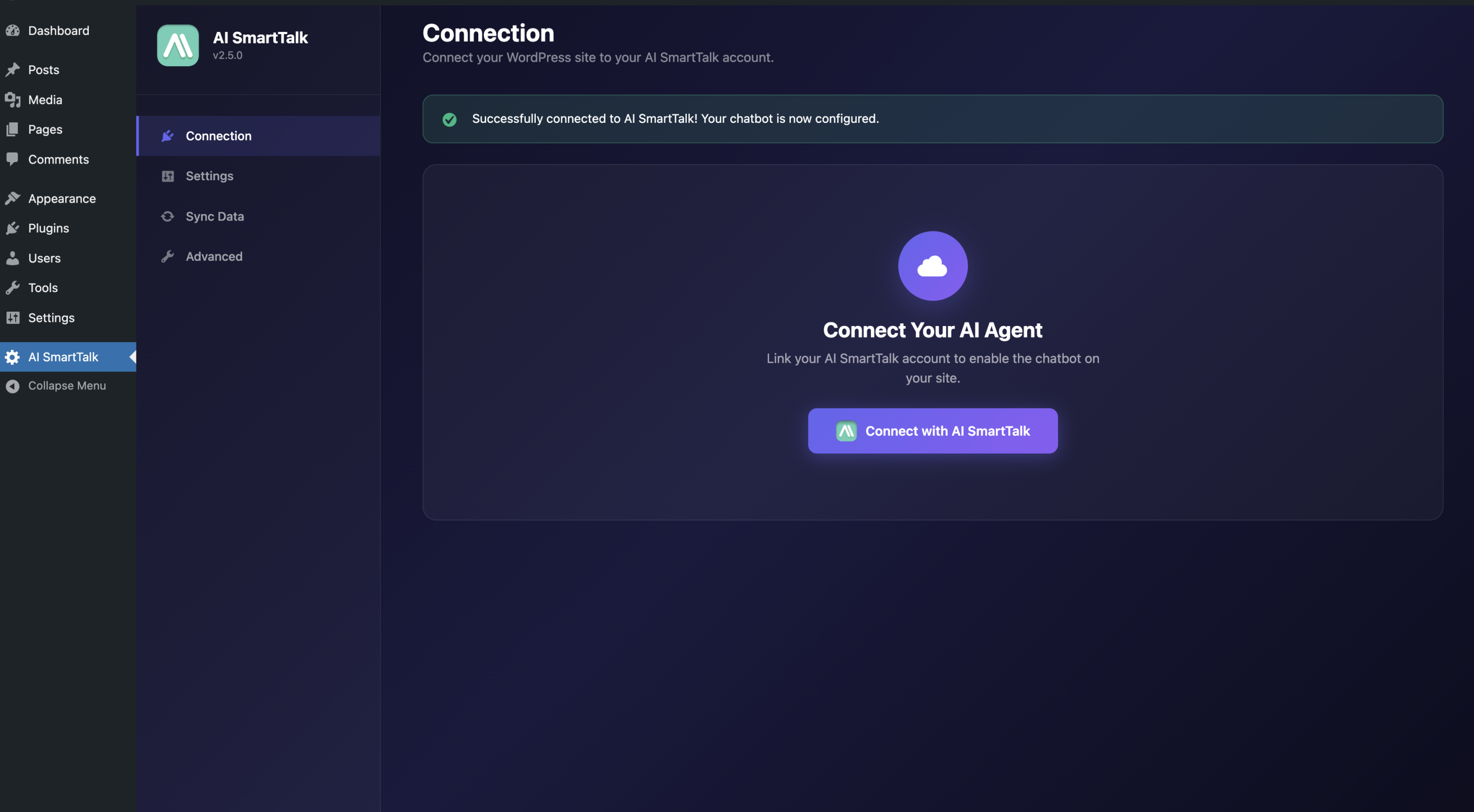 Verbindungsknäppchen an WordPress - OAuth Verbindung gëtt mat engem Klick etabléiert.
Fir méi Detailer iwwer d'Verbinding:
Schrëtt 5: Personnaliséiert Ären Chatbot
Wärend d'AI Ären Inhalt am Hannergrond léiert, kënnt Dir d'Aussehen vun Ärem Chatbot personaliséieren:
- Faarwen déi mat Ärer Mark passen
- Personaliséiert Begrëßungsbotschaft
- Avatar oder Äert Firmenlogo
- Positioun op der Säit (ënnen riets, lénks, asw.)
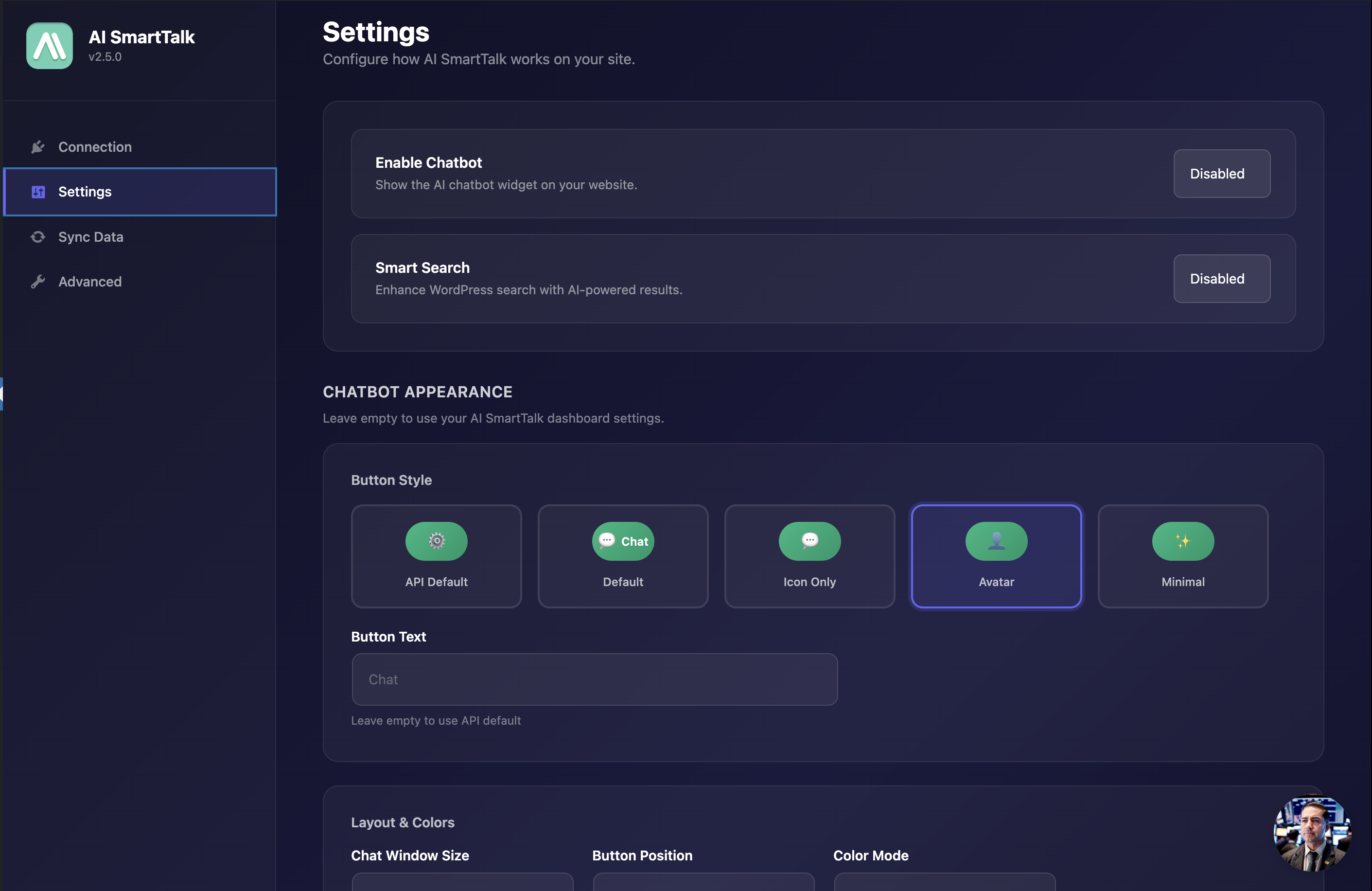 Personnaliséiert d'Aussehen vun Ärem Chatbot direkt aus WordPress.
Konsultéiert eis Personalisatiounsleitfäden:
An dat ass et. Ären Chatbot ass online, et kennt Är Site, an et ass bereet fir Äre Besucher ze äntweren.
Dir kënnt nach Wëssen manuell derbäi addéieren
Automatesch Léieren deckt 90% vun de Bedierfnesser. Awer heiansdo hutt Dir Informatiounen déi net op Ärer Site sinn:
- Ouverture Stonnen vun Ärem physesche Buttek
- Aktuell Promotiounen déi nach net verëffentlecht sinn
- Spezifesch Äntwerten fir Är Industrie
- Intern Informatiounen déi Dir deelen wëllt
Eis manuell FAQ System bleift verfügbar. Dir kënnt sou vill personaliséiert Fro-Antwort-Paare derbäi addéieren wéi Dir wëllt, zousätzlech zu den automatesch geléierten Inhalter.
De Chatbot kombinéiert béid Quellen fir déi relevantst Äntwert op all Fro ze ginn.
Konsultéiert eis Wëssenbasis Management Guide fir ze léieren wéi Dir manuell Wëssen derbäi kënnt.
Firwat AI SmartTalk fir Ären CMS Chatbot wielen?
Eng AI déi wierklech mat Äre Clienten schwätzt
Eise Chatbot sicht net just no Schlësselwieder an enger Datebank. Et verstan d'Bedeitung vun de Froen an formuléiert natierlech Äntwerten, wéi e richtege Beroder et géif maachen.
E Besucher freet "Wat ass de Delay fir meng Bestellung ze kréien?" wann Är Säit seet "Liwwerung bannent 48 Stonnen"? Et mécht d'Verbinding an äntwert richteg.
Entdeckt wéi et funktionnéiert:
37 Sproochen ënnerstëtzt
Zieht Är Site international Besucher un? De Chatbot äntwert automatesch an der Sprooch vun Ärem Client. Fränzesch, Englesch, Däitsch, Spuenesch, Polnesch, an 32 aner Sproochen.
Eng Dashboard fir alles ze verfollegen
Kuckt all Är Chatbot Gespréicher, analyséiert d'Froën déi dacks gestallt ginn, identifizéiert Themen wou Informatiounen feelen. Dir behält komplett Visibilitéit iwwer wat geschitt.
Konsultéiert de Dashboard Guide fir ze léieren wéi Dir all Analysefunktiounen benotze kënnt.
Responsiv Ënnerstëtzung
Eng Fro? E Problem? Eis Team äntwert séier fir Iech ze hëllefen. Konsultéiert och eis komplett Dokumentatioun fir Äntwerten op Är Froen ze fannen.
Probéiert et elo gratis
D'WordPress, PrestaShop, an Joomla Integratioun ass haut verfügbar.
Kreéiert Ären gratis Kont, verbonnen Äre Site an 3 Klicker, an entdeckt wat e wierklech intelligenten Chatbot fir Äre Geschäft kann maachen.
Zousätzlech Ressourcen
Detailléiert Integratiounsleitfäden
Fir Schrëtt-fir-Schrëtt Instruktiounen déi spezifesch fir all CMS sinn:
Funktiounsseiten
Entdeckt all verfügbar Funktiounen fir all Plattform:
Chatbot Konfiguratioun
Soubal Äert CMS verbonnen ass, konsultéiert eis Chatbot Konfiguratiounsleitfaden fir d'Aussehen an d'Verhalen ze personaliséieren.
Benotzt Dir eng aner CMS? Kontaktéiert eis fir iwwer eng personaliséiert Integratioun ze diskutéieren.