Your AI Chatbot That Already Knows Everything About Your WordPress, PrestaShop, or Joomla Site — No Configuration Required

Installing an intelligent chatbot on your e-commerce site or blog has never been easier. Discover how to connect your CMS in 3 clicks and let artificial intelligence automatically learn all your content.
Why Install an AI Chatbot on Your Website in 2026?
Your visitors want instant answers. Whether it's a PrestaShop online store, a WordPress site, or a Joomla portal, internet users no longer have the patience to search for information. They ask a question, they want an answer. Now.
A well-configured AI chatbot transforms your visitors' experience. It answers frequently asked questions about your products, guides hesitant buyers, and frees your team from repetitive requests. The problem until now? Configuring a truly intelligent chatbot required time, technical skills, and a lot of patience.
You typically had to copy API keys, install complex plugins, then spend hours "training" the chatbot by manually teaching it every piece of information about your business, your products, your services.
Result: many gave up along the way, or ended up with a basic chatbot incapable of correctly answering their customers' real questions.
That's exactly the problem we wanted to solve.
Discover our specific solutions:
- WordPress & WooCommerce - 5-minute installation
- PrestaShop - Complete e-commerce support
- Joomla & HikaShop - Automatic synchronization
The New AI SmartTalk Integration for WordPress, PrestaShop, and Joomla
We've completely rethought how a chatbot connects to your site. Our goal was simple: anyone, even without any technical skills, should be able to install a high-performance AI chatbot in less than 5 minutes.
Here's how it works now.
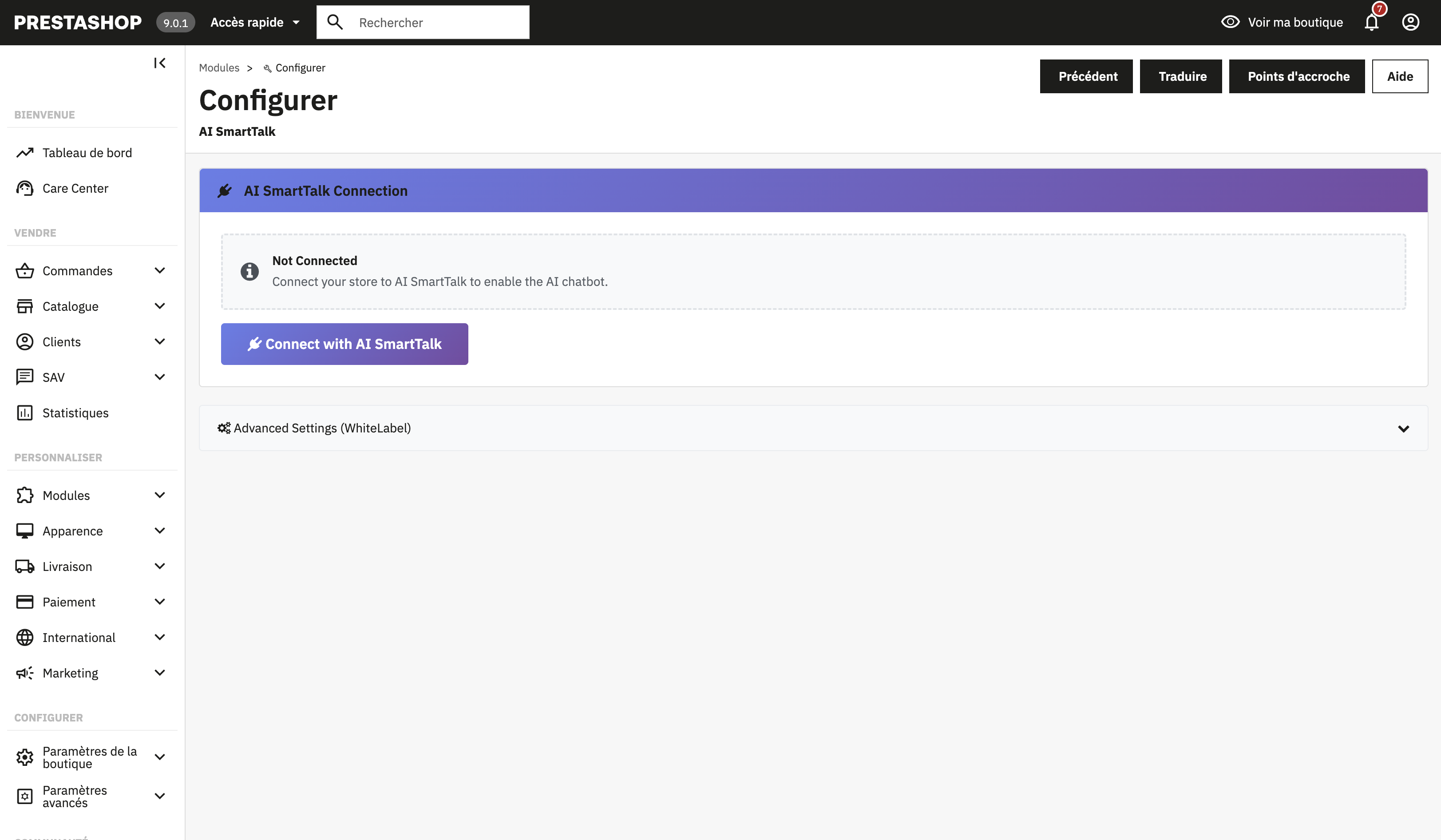 Connect your CMS to AI SmartTalk in 3 clicks with our secure OAuth system.
Secure Connection in 3 Clicks
Forget copying and pasting API keys, modifying configuration files, or 45-minute YouTube tutorials.
With our new authentication system, you connect your CMS site to AI SmartTalk in exactly 3 clicks:
- You install our plugin on your CMS
- You click "Connect to AI SmartTalk"
- The secure connection is established automatically
The connection uses our internally developed OAuth authentication system. This means your credentials never pass through an external service. The connection is direct between your site and AI SmartTalk, encrypted, and you can revoke it at any time.
Artificial Intelligence Automatically Learns Your Content
This is where the magic happens. Once the connection is established, your chatbot doesn't remain an empty shell waiting for you to teach it everything.
It will automatically explore and learn:
On WordPress:
- All your published pages
- All your blog posts
- Your WooCommerce products (if you have a store)
- Your categories and tags
- Your existing FAQs
💡 For e-commerce stores: Discover all e-commerce features in our dedicated e-commerce guide or the WordPress & WooCommerce page.
On PrestaShop:
- Your complete product catalog
- Detailed descriptions of each item
- Your categories and subcategories
- Shipping and return information
- Your CMS pages (legal notices, about, etc.)
🛒 Discover PrestaShop: Check out the complete PrestaShop page with all multi-language e-commerce features.
On Joomla:
- All your published articles
- Your content pages
- Your category structure
- Your custom content modules
- Your HikaShop products (if you use HikaShop)
🌐 Discover Joomla: Explore all features on the Joomla & HikaShop page.
The chatbot indexes all this content and becomes able to reference it naturally in conversations with your visitors.
What Does This Actually Change for You?
Before: Hours of Manual Configuration
Imagine you have a PrestaShop store with 300 products. With traditional solutions, you had to:
- Export your products to a CSV file
- Format that file according to the chatbot's requirements
- Import it into the platform
- Verify that everything went well
- Start over every time you add or modify a product
Not to mention the frequently asked questions the chatbot couldn't answer because the information was on a page you forgot to import.
Now: 3 Clicks and It's Online
You connect your site, the chatbot learns on its own, and it updates automatically when you modify your content.
You add a new product on PrestaShop? The chatbot knows it. You publish a blog post on WordPress? It can talk about it. You update your shipping terms on Joomla? It gives the correct information.
No more gap between what's on your site and what your chatbot knows.
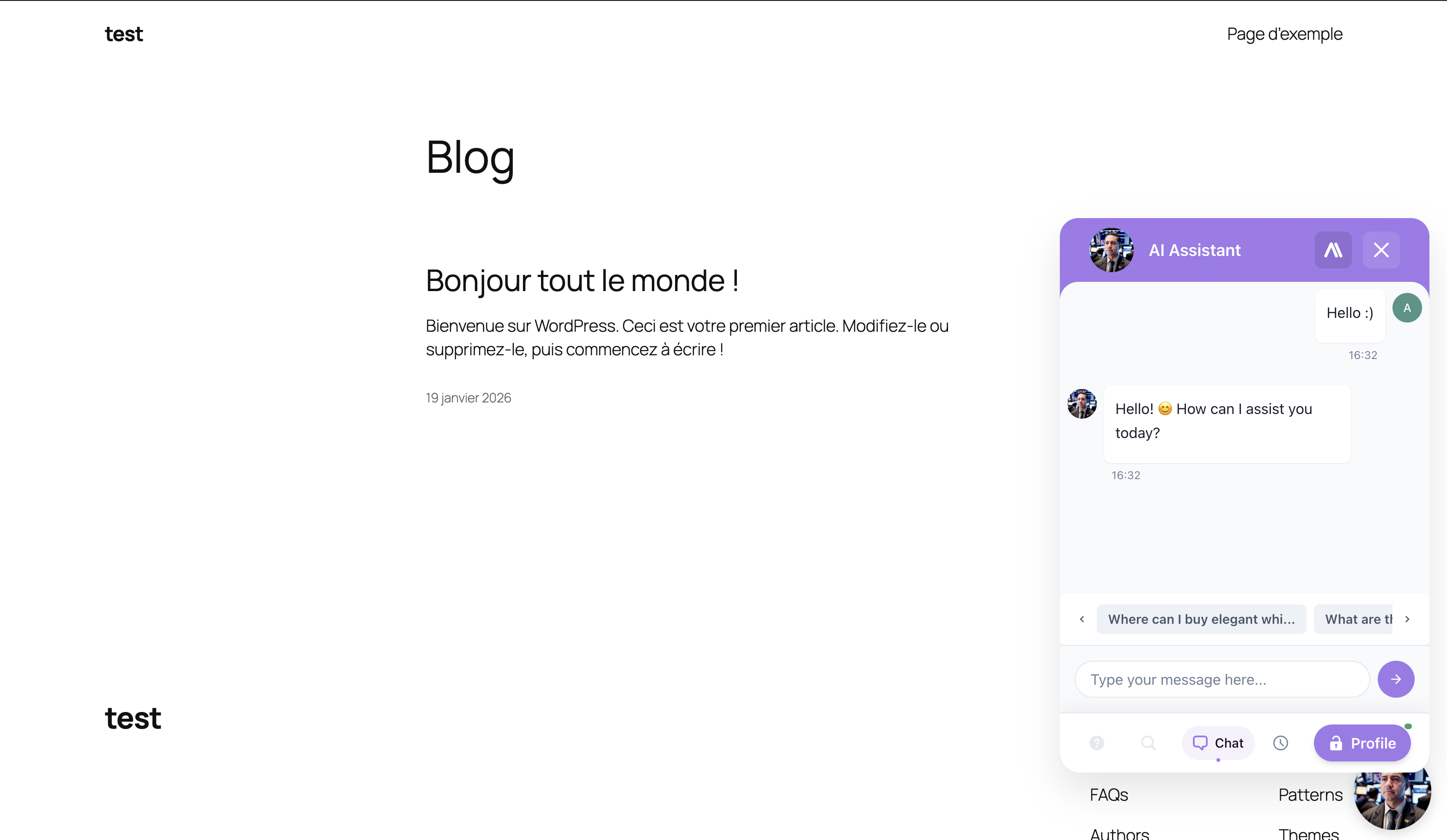 Your chatbot is now online and answering your visitors' questions.
Discover the complete features:
- WordPress & WooCommerce - All Features
- PrestaShop - Multi-language Support
- Joomla & HikaShop - Automatic Synchronization
Security at the Heart of Integration
We know that connecting an external service to your site can be scary. It's your business, your customer data, your reputation.
That's why we developed our own authentication system rather than going through a third-party service.
How Does Our In-House OAuth Work?
OAuth is a standard protocol that allows two services to communicate securely without sharing passwords. When you use "Sign in with Google" on a site, that's OAuth.
Our implementation works on the same principle, but directly between your CMS and AI SmartTalk:
- No intermediary: your data never passes through any third-party service
- Encrypted connection: all communications use HTTPS
- Limited permissions: the chatbot accesses only the public content of your site, never sensitive data
- Revocable at any time: you can cut the connection with one click from your dashboard
What Can the Chatbot See on Your Site?
Only public content. That is, the information that any visitor to your site can already see:
- Published pages
- Blog posts
- Product pages
- Categories
The chatbot does not have access to:
- Your customer data
- Orders
- Payment information
- Your admin panel
- Draft or private content
How to Install the Chatbot on Your CMS in 5 Minutes
Here's the complete process, step by step.
Step 1: Create Your AI SmartTalk Account
If you haven't already, sign up for free on AI SmartTalk. Registration takes 30 seconds and doesn't require a credit card.
Step 2: Find the Integration for Your CMS
In your dashboard, use the search bar and simply type "WordPress", "PrestaShop", or "Joomla". You'll arrive directly on the corresponding integration page. You can also consult our detailed guides:
Step 3: Download and Install the Plugin
From this page, download the plugin for your CMS. Install it like any extension:
On WordPress: Plugins > Add New > Upload Plugin, then activate
On PrestaShop: Modules > Module Manager > Install
On Joomla: Extensions > Install
Our plugins are also being published on the official stores of each platform. In a few days, you'll be able to install them directly from the WordPress, PrestaShop, and Joomla extension catalogs, without even going through AI SmartTalk.
To discover all the specific features for each CMS:
- WordPress & WooCommerce Chatbot - Complete Features
- PrestaShop Chatbot - Multi-language E-commerce
- Joomla & HikaShop Chatbot - Automatic Synchronization
Step 4: Authorize the Connection
Once the plugin is activated, click "Connect to AI SmartTalk". The secure connection is established automatically and your content synchronization starts.
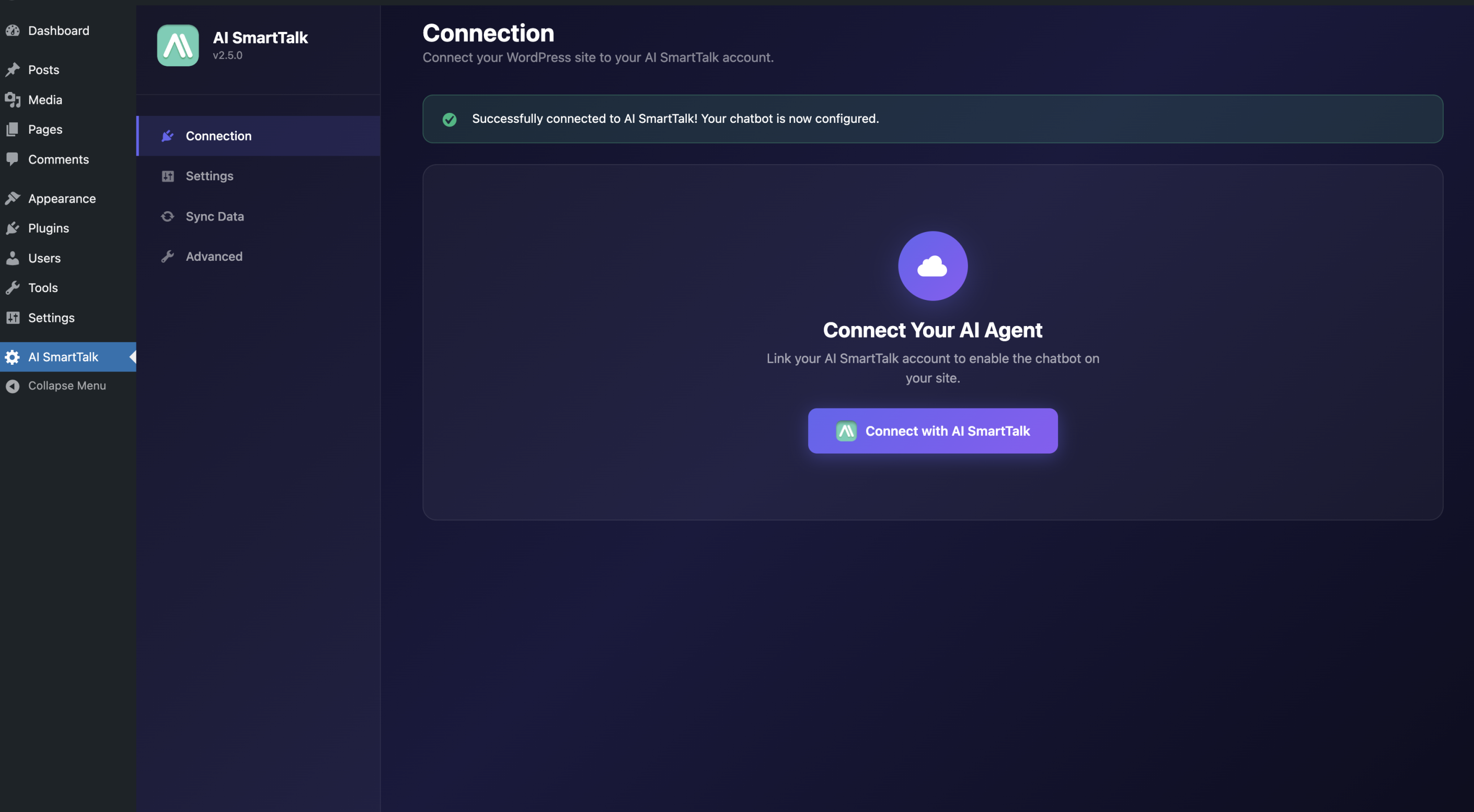 Connection button in WordPress - OAuth connection is established with one click.
For more details on the connection:
Step 5: Customize Your Chatbot
While the AI learns your content in the background, you can customize your chatbot's appearance:
- Colors matching your brand
- Custom welcome message
- Avatar or your company logo
- Position on the page (bottom right, left, etc.)
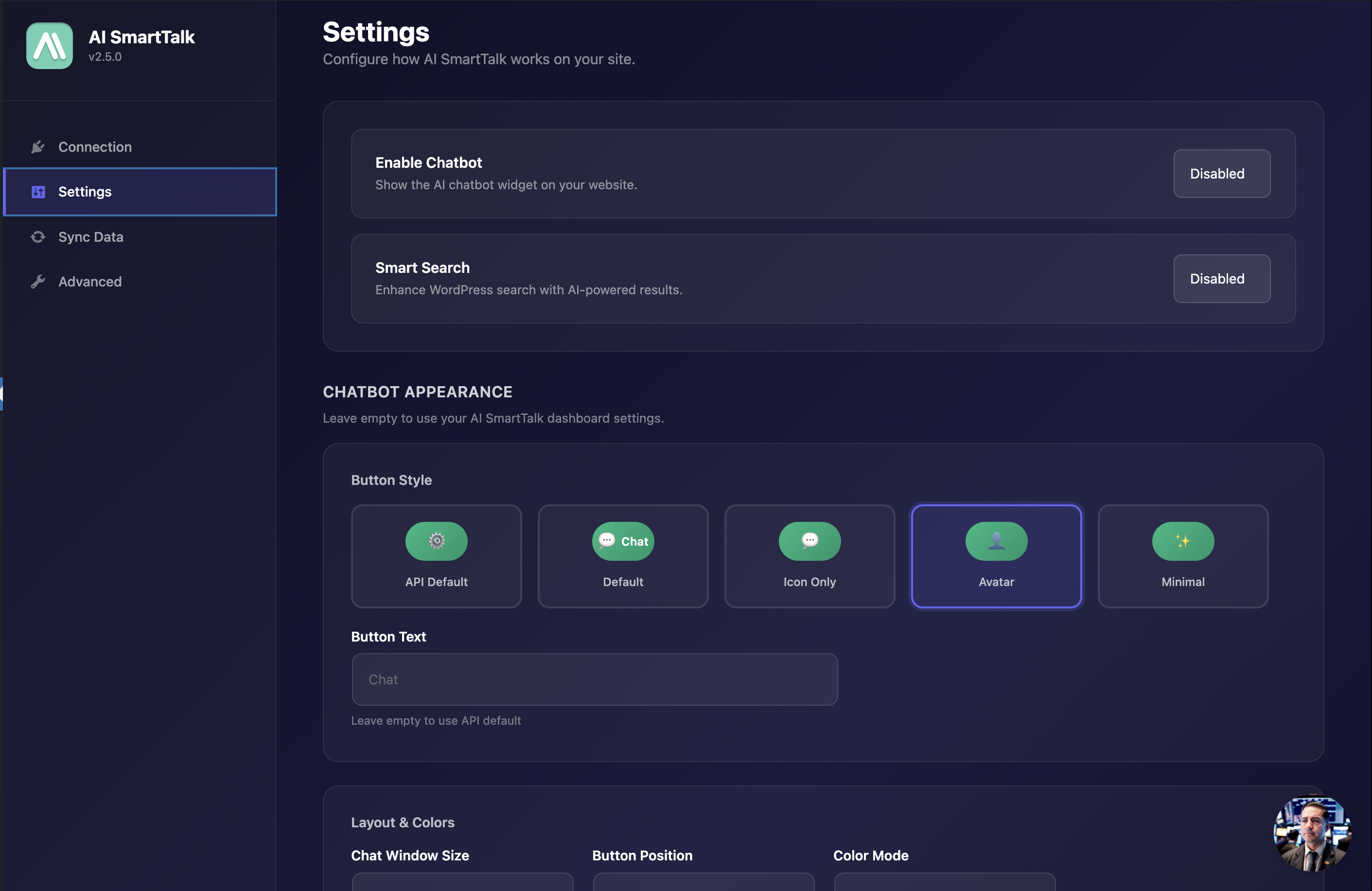 Customize your chatbot's appearance directly from WordPress.
Consult our customization guides:
And that's it. Your chatbot is online, it knows your site, and it's ready to answer your visitors.
You Can Still Add Knowledge Manually
Automatic learning covers 90% of needs. But sometimes, you have information that's not on your site:
- Opening hours of your physical store
- Ongoing promotions not yet published
- Specific responses for your industry
- Internal information you want to share
Our manual FAQ system remains available. You can add as many custom question-answer pairs as you want, in addition to the automatically learned content.
The chatbot combines both sources to provide the most relevant answer to each question.
Consult our knowledge base management guide to learn how to add manual knowledge.
Why Choose AI SmartTalk for Your CMS Chatbot?
An AI That Really Talks to Your Customers
Our chatbot doesn't just search for keywords in a database. It understands the meaning of questions and formulates natural responses, like a real advisor would.
A visitor asks "What's the delay to receive my order?" when your page says "delivery within 48 hours"? It makes the connection and responds correctly.
Discover how it works:
37 Languages Supported
Does your site attract international visitors? The chatbot responds in your customer's language, automatically. French, English, German, Spanish, Polish, and 32 other languages.
A Dashboard to Track Everything
View all your chatbot conversations, analyze frequent questions, identify topics where information is missing. You maintain complete visibility on what's happening.
Consult the dashboard guide to learn how to use all analysis features.
Responsive Support
A question? A problem? Our team responds quickly to unblock you. Also consult our complete documentation to find answers to your questions.
Try It Free Right Now
The WordPress, PrestaShop, and Joomla integration is available today.
Create your free account, connect your site in 3 clicks, and discover what a truly intelligent chatbot can do for your business.
Additional Resources
Detailed Integration Guides
For step-by-step instructions specific to each CMS:
Feature Pages
Discover all available features for each platform:
Chatbot Configuration
Once your CMS is connected, consult our chatbot configuration guide to personalize the appearance and behavior.
Using another CMS? Contact us to discuss a custom integration.