SmartFlow Actions
Actions are the building blocks of your workflows. They execute after a trigger fires.
In the Node Library, actions are marked with a blue 🔧 ACTION badge.
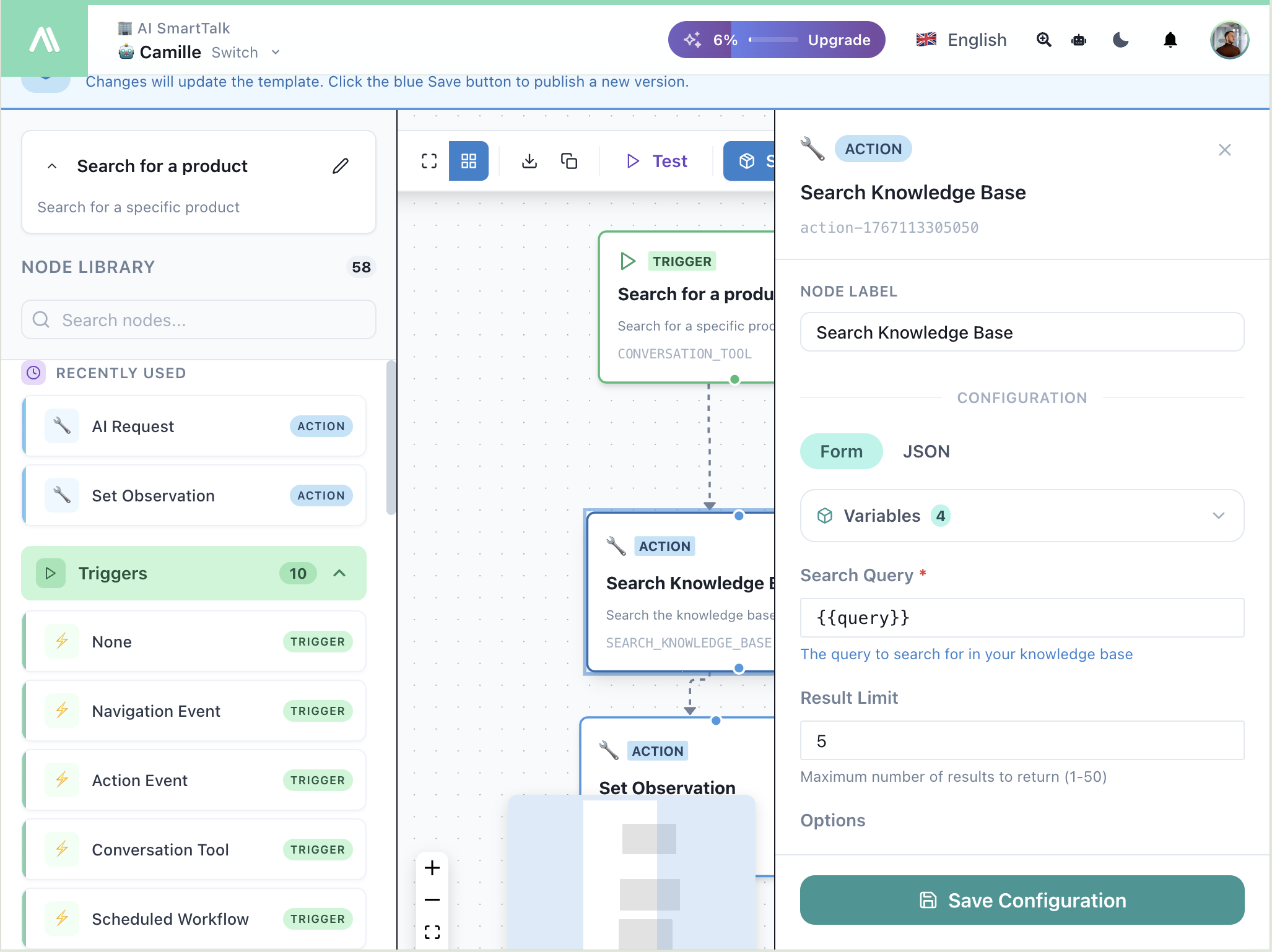
Configuring Actions
Click any action node to open its configuration panel:
| Element | Description |
|---|---|
| Node Label | Custom name for this node |
| Form / JSON | Toggle between visual form and raw JSON |
| Variables | Available variables from previous nodes |
| Configuration | Action-specific settings |
| Save Configuration | Apply changes |
Use {{variableName}} syntax to reference variables from triggers or previous actions.
💬 Chat Actions
| Action | Description | Documentation |
|---|---|---|
| Send Message | Send message to conversation | View → |
| Search Knowledge | Query knowledge base | View → |
| Add Tag | Tag the conversation | View → |
| Set Observation | Add internal note | View → |
| Set Suggestions | Display suggested replies | View → |
| Set Conversation | Update conversation properties | View → |
🤖 AI Actions
| Action | Description | Documentation |
|---|---|---|
| AI Request | Send prompt to AI | View → |
| AI Condition | AI-powered branching | View → |
📧 Email Actions
| Action | Description | Documentation |
|---|---|---|
| Send Email | Send email via SMTP | View → |
🌐 API Actions
| Action | Description | Documentation |
|---|---|---|
| API Call | HTTP request to external API | View → |
📚 Knowledge Actions
| Action | Description | Documentation |
|---|---|---|
| Search Knowledge | Query your knowledge base | View → |
| Save Knowledge | Add content to knowledge base | View → |
| RSS Update | Trigger RSS feed sync | View → |
| Sync Connector | Trigger data sync | View → |
📝 SmartForms Actions
| Action | Description | Documentation |
|---|---|---|
| Get SmartForm | Retrieve form data | View → |
| SmartForm AI Request | Process form with AI | View → |
📄 Document Actions
| Action | Description | Documentation |
|---|---|---|
| Generate PDF | Create PDF document | View → |
📱 Meta Actions (Facebook/Instagram)
| Action | Description | Documentation |
|---|---|---|
| Show Typing | Display typing indicator | View → |
| Hide Typing | Remove typing indicator | View → |
| Mark as Read | Mark message as seen | View → |
🔀 Control Flow
| Node | Description | Documentation |
|---|---|---|
| If Condition | Branch based on conditions | View → |
| AI Condition | AI-powered branching | View → |
| Parallel Execution | Split into parallel branches | View → |
🔌 Connector Actions
| Connector | Actions | Documentation |
|---|---|---|
| JIRA | Create issue, update, transition | View → |
| ClickUp | Create task, update, status | View → |
| Google Drive | Sync, upload, create folder | View → |
| Gmail | Create draft, send, labels | View → |
| Cursor | Cloud agent actions | View → |