Synchronization
Synchronize your Shopify store data with AI SmartTalk so your AI assistant always has up-to-date information about your products.
Product synchronization
Running a sync
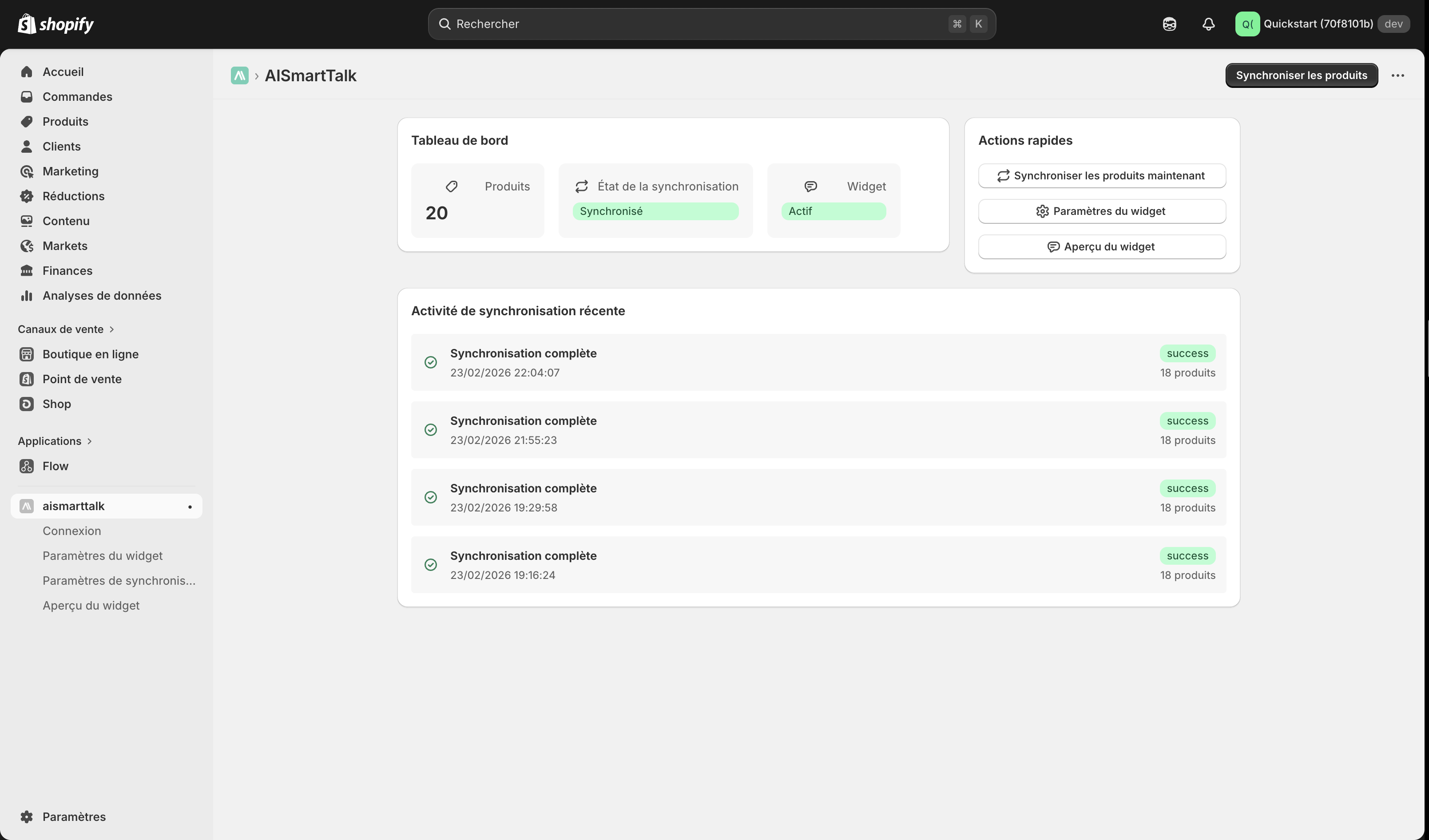
- In your Shopify admin, open the AI SmartTalk app
- Check the product count and sync status on the dashboard
- Click Synchronize to send your products to AI SmartTalk
- Wait while your products are synced
- A success message appears when complete
tip
Your products will appear in the Knowledge section of your AI SmartTalk dashboard, where you can review and manage them.
Automatic sync
The app automatically keeps your AI assistant up to date:
- Product created — New products are synced automatically
- Product updated — Changes to existing products are pushed in real time
- Product deleted — Removed products are cleaned up from AI SmartTalk
Sync activity log
The AI SmartTalk dashboard displays a detailed activity log so you can track:
- When the last sync occurred
- How many products were synced, updated, or removed
- Any errors that occurred during synchronization
Next steps
Alternative
You can also import your product catalog via a CSV URL integration. This can be useful if you need to import data from sources outside Shopify, but for most use cases the built-in app synchronization above is simpler and recommended.