Gmail Actions
Automate your email workflows with comprehensive Gmail actions. Send emails, manage drafts, search your inbox, and handle email threads — all within SmartFlow.
Prerequisites
Before using Gmail actions, you must:
- Connect your Gmail account in Channels → Gmail
- Authorize the required permissions via Google OAuth
See Gmail Channel Setup for detailed connection instructions.
Available Triggers
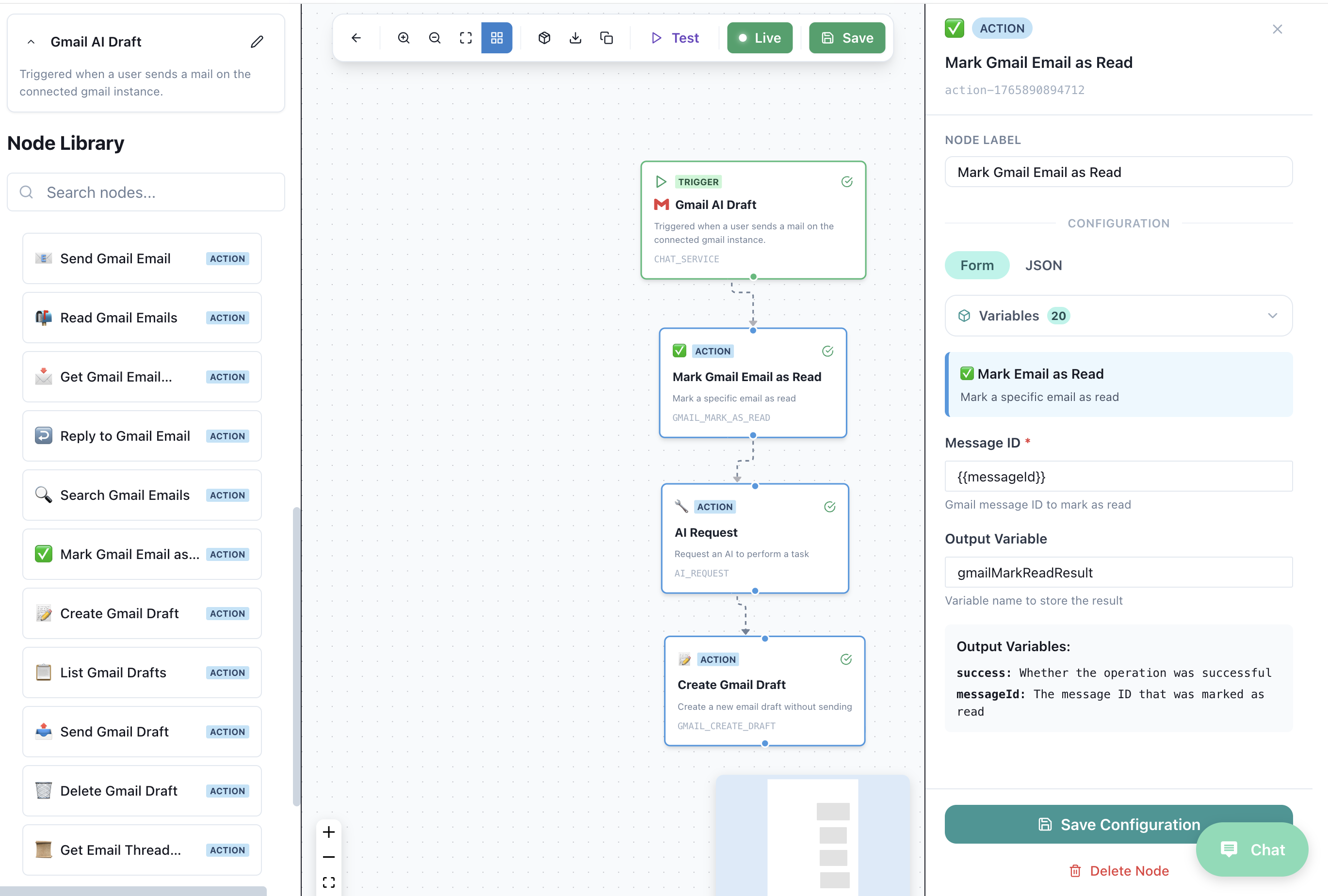
📥 Gmail AI Draft
Trigger Type: CHAT_SERVICE
Triggered when a user sends an email to your connected Gmail instance. Use this to automatically process incoming emails with AI.
| Field | Description |
|---|---|
| Channel | Gmail |
| Event | New email received |
Example Workflow:
Gmail AI Draft (Trigger)
    ↓
AI Request (Analyze email content)
    ↓
Create Gmail Draft (Generate AI response)
Available Actions
| Action | Code | Description |
|---|---|---|
| 📤 Send Gmail Email | GMAIL_SEND_EMAIL | Send a new email directly |
| 📬 Read Gmail Emails | GMAIL_READ_EMAILS | Fetch emails from your inbox |
| 📧 Get Gmail Email | GMAIL_GET_EMAIL | Get a specific email by ID |
| ↩️ Reply to Gmail Email | GMAIL_REPLY | Reply to an existing email thread |
| 🔍 Search Gmail Emails | GMAIL_SEARCH | Search emails with Gmail query syntax |
| ✅ Mark Gmail Email as Read | GMAIL_MARK_READ | Mark an email as read |
| 📝 Create Gmail Draft | GMAIL_CREATE_DRAFT | Create a new email draft |
| 📋 List Gmail Drafts | GMAIL_LIST_DRAFTS | List all drafts in your account |
| 📨 Send Gmail Draft | GMAIL_SEND_DRAFT | Send an existing draft |
| 🗑️ Delete Gmail Draft | GMAIL_DELETE_DRAFT | Delete a draft |
| 📂 Get Email Thread | GMAIL_GET_THREAD | Retrieve full email conversation |
📤 Send Gmail Email
Send a new email directly from your connected Gmail account.
Configuration
| Field | Type | Required | Description |
|---|---|---|---|
| To | ✅ | Recipient email address | |
| Subject | String | ✅ | Email subject line |
| Body | String | ✅ | Email content (HTML supported) |
| CC | ❌ | Carbon copy recipients | |
| BCC | ❌ | Blind carbon copy recipients |
Output Variables
| Variable | Type | Description |
|---|---|---|
messageId | String | Unique ID of sent email |
threadId | String | Thread ID for replies |
Example
Action: Send Gmail Email
  To: "{{customer_email}}"
  Subject: "Your order #{{order_id}} has shipped!"
  Body: |
    Hi {{customer_name}},

    Great news! Your order has shipped.

    Tracking number: {{tracking_number}}

    Best regards,
    The Team
📬 Read Gmail Emails
Fetch recent emails from your inbox with optional filtering.
Configuration
| Field | Type | Required | Description |
|---|---|---|---|
| Max Results | Number | ❌ | Maximum emails to retrieve (default: 10) |
| Label | String | ❌ | Gmail label to filter (e.g., "INBOX", "UNREAD") |
| Query | String | ❌ | Gmail search query |
Output Variables
| Variable | Type | Description |
|---|---|---|
emails | Array | List of email objects |
emails[].id | String | Email ID |
emails[].subject | String | Email subject |
emails[].from | String | Sender email |
emails[].snippet | String | Email preview |
emails[].date | String | Received date |
Example
Action: Read Gmail Emails
  Max Results: 5
  Label: "UNREAD"
  Query: "from:support@example.com"
📧 Get Gmail Email
Retrieve a specific email by its ID with full content.
Configuration
| Field | Type | Required | Description |
|---|---|---|---|
| Email ID | String | ✅ | The Gmail message ID |
Output Variables
| Variable | Type | Description |
|---|---|---|
email | Object | Full email object |
email.id | String | Email ID |
email.threadId | String | Thread ID |
email.subject | String | Email subject |
email.from | String | Sender |
email.to | String | Recipients |
email.body | String | Full email body |
email.date | String | Date received |
email.attachments | Array | List of attachments |
↩️ Reply to Gmail Email
Reply to an existing email, maintaining the thread context.
Configuration
| Field | Type | Required | Description |
|---|---|---|---|
| Thread ID | String | ✅ | The thread to reply to |
| Message ID | String | ✅ | The specific message to reply to |
| Body | String | ✅ | Reply content |
| Reply All | Boolean | ❌ | Reply to all recipients (default: false) |
Output Variables
| Variable | Type | Description |
|---|---|---|
messageId | String | ID of the reply |
threadId | String | Thread ID |
Example
Action: Reply to Gmail Email
  Thread ID: "{{email.threadId}}"
  Message ID: "{{email.id}}"
  Body: |
    {{ai_response}}

    ---
    This is an AI-assisted response.
🔍 Search Gmail Emails
Search your Gmail using Gmail's powerful query syntax.
Configuration
| Field | Type | Required | Description |
|---|---|---|---|
| Query | String | ✅ | Gmail search query |
| Max Results | Number | ❌ | Maximum results (default: 10) |
Gmail Query Syntax
| Query | Description |
|---|---|
from:email@example.com | Emails from specific sender |
to:email@example.com | Emails to specific recipient |
subject:keyword | Subject contains keyword |
is:unread | Unread emails only |
is:starred | Starred emails |
has:attachment | Emails with attachments |
after:2025/01/01 | Emails after date |
before:2025/12/31 | Emails before date |
label:important | Emails with label |
"exact phrase" | Exact phrase match |
Example
Action: Search Gmail Emails
  Query: "from:{{customer_email}} is:unread subject:order"
  Max Results: 5
✅ Mark Gmail Email as Read
Mark an email as read in Gmail.
Configuration
| Field | Type | Required | Description |
|---|---|---|---|
| Email ID | String | ✅ | The email to mark as read |
Example
Action: Mark Gmail Email as Read
  Email ID: "{{email.id}}"
📝 Create Gmail Draft
Create a draft email for human review before sending.
Configuration
| Field | Type | Required | Description |
|---|---|---|---|
| To | ✅ | Recipient email | |
| Subject | String | ✅ | Email subject |
| Body | String | ✅ | Email content |
| CC | ❌ | Carbon copy | |
| BCC | ❌ | Blind carbon copy | |
| Thread ID | String | ❌ | For draft replies |
Output Variables
| Variable | Type | Description |
|---|---|---|
draftId | String | ID of created draft |
messageId | String | Message ID |
Use Case: AI Draft Mode
Trigger: Gmail AI Draft
    ↓
AI Request:
  Prompt: "Generate a professional response to this email"
  Input: "{{email.body}}"
    ↓
Create Gmail Draft:
  To: "{{email.from}}"
  Subject: "Re: {{email.subject}}"
  Body: "{{ai_response}}"
📋 List Gmail Drafts
Retrieve all drafts from your Gmail account.
Configuration
| Field | Type | Required | Description |
|---|---|---|---|
| Max Results | Number | ❌ | Maximum drafts to list |
Output Variables
| Variable | Type | Description |
|---|---|---|
drafts | Array | List of draft objects |
drafts[].id | String | Draft ID |
drafts[].message | Object | Draft message preview |
📨 Send Gmail Draft
Send an existing draft from your Gmail.
Configuration
| Field | Type | Required | Description |
|---|---|---|---|
| Draft ID | String | ✅ | The draft to send |
Output Variables
| Variable | Type | Description |
|---|---|---|
messageId | String | ID of sent message |
threadId | String | Thread ID |
🗑️ Delete Gmail Draft
Delete a draft from your Gmail account.
Configuration
| Field | Type | Required | Description |
|---|---|---|---|
| Draft ID | String | ✅ | The draft to delete |
📂 Get Email Thread
Retrieve a complete email conversation thread.
Configuration
| Field | Type | Required | Description |
|---|---|---|---|
| Thread ID | String | ✅ | The thread to retrieve |
Output Variables
| Variable | Type | Description |
|---|---|---|
thread | Object | Full thread object |
thread.id | String | Thread ID |
thread.messages | Array | All messages in thread |
thread.historyId | String | History ID |
Example
Action: Get Email Thread
  Thread ID: "{{email.threadId}}"
Complete Workflow Examples
Example 1: AI Email Assistant
Automatically process incoming emails and create AI-generated draft responses.
Gmail AI Draft (Trigger)
    ↓
Get Email Thread (Get full context)
    ↓
AI Request
  - System: "You are a helpful email assistant"
  - Input: "{{thread.messages}}"
  - Output: Structured (response, sentiment, urgency)
    ↓
If Condition: urgency == "high"
    ├── Yes: Send Gmail Email (immediate response)
    └── No: Create Gmail Draft (for review)
Example 2: Email Search & Process
Search for specific emails and process them in bulk.
Scheduled Workflow (Daily at 9 AM)
    ↓
Search Gmail Emails
  Query: "is:unread from:customers@* after:yesterday"
    ↓
For Each: email in emails
    ↓
AI Request (Categorize email)
    ↓
If Condition: category == "support"
    └── Create JIRA Issue
Example 3: Draft Review Workflow
Create drafts, let humans review, then send.
Gmail AI Draft (Trigger)
    ↓
AI Request (Generate response)
    ↓
Create Gmail Draft
    ↓
Send Slack Message
  "New draft ready for review from {{email.from}}"
Best Practices
1. Use Draft Mode for Critical Emails
For customer-facing or sensitive emails, always use Create Gmail Draft instead of Send Gmail Email. This allows human review before sending.
2. Leverage Thread Context
Use Get Email Thread before responding to ensure your AI has full conversation context.
3. Implement Rate Limiting
Gmail has API quotas. For high-volume workflows:
- Add delays between actions
- Batch operations when possible
- Monitor your quota usage
4. Use Smart Search Queries
Combine Gmail query operators for precise filtering:
from:vip-customer@* is:unread subject:(urgent OR critical) after:2025/01/01
5. Handle Errors Gracefully
Use If Condition nodes to check for errors and implement fallback logic.