AI Model & BYOK
The AI Model page is where you decide which AI powers your assistant — for every capability, not just chat. Open it from your assistant in the admin → left-hand menu → AI Model.
AI SmartTalk picks sensible defaults during onboarding, so most assistants work great without ever opening this page. Come here when you want EU data sovereignty, a specific model, or to plug in your own provider key.
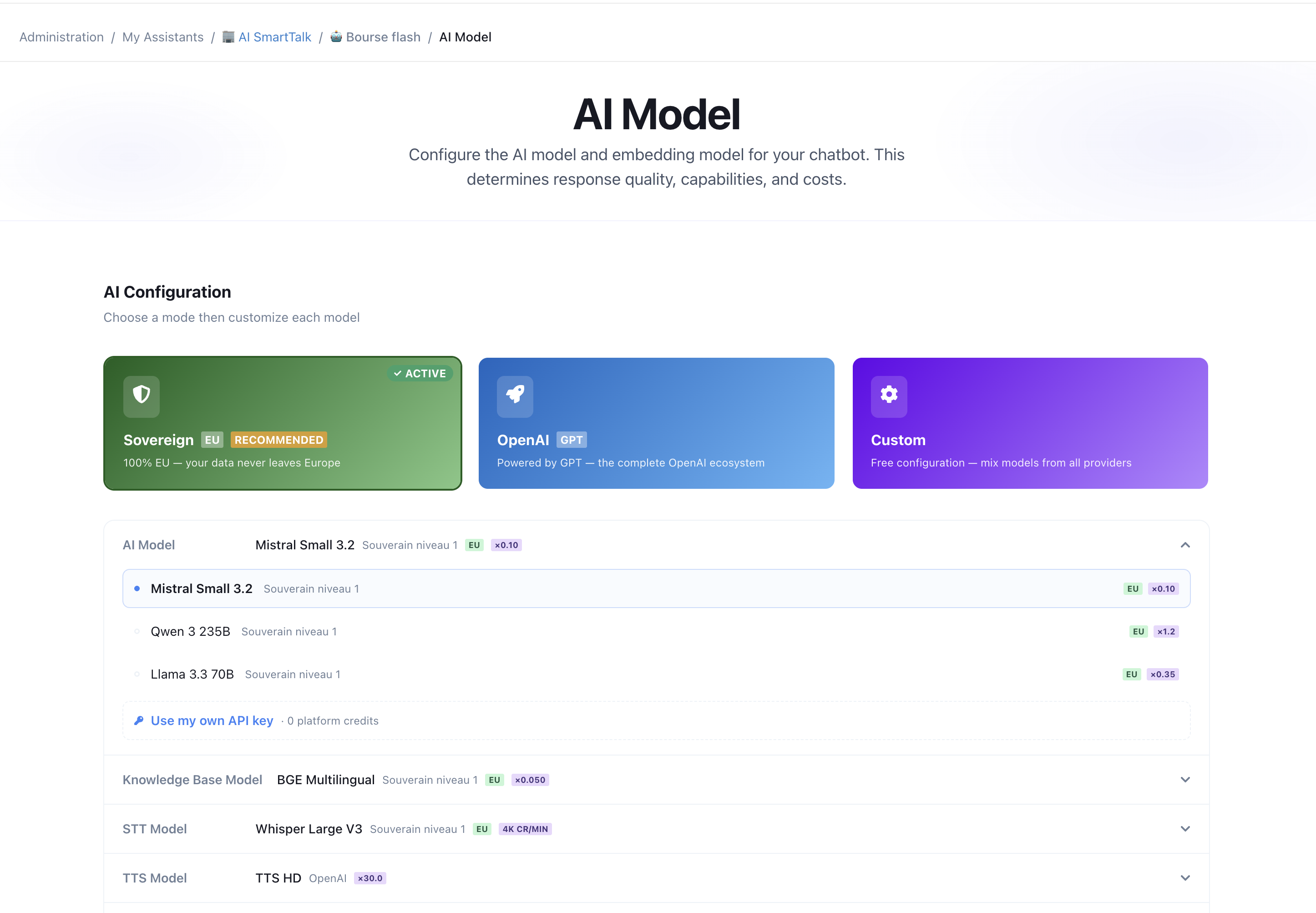
Choose a mode
At the top of the page you pick a mode that sets sensible models across the board:
| Mode | What it does | Best for |
|---|---|---|
| Sovereign | 100% EU models hosted in France (Mistral, Qwen, Llama). Your data never leaves Europe. | GDPR-sensitive use, data sovereignty |
| OpenAI | GPT models across every capability. | Maximum capability, you're fine with US processing |
| Custom | Mix models from any provider, capability by capability — and bring your own API key (BYOK). | Full control, cost optimization |
You can always fine-tune individual capabilities below the mode cards.
Customize each capability
In Custom mode, every capability has its own selector:
- Chat (LLM) — generates the responses your customers read.
- Knowledge Base — turns your documents into searchable knowledge (embeddings).
- Speech-to-Text — transcribes voice messages.
- Text-to-Speech — gives your assistant a voice.
- Vision — understands images customers send.
Each shows the model name, its provider, an EU badge for sovereign models, and a credit cost. Pick the one that fits your needs — mix sovereign and proprietary freely.
Bring Your Own Key (BYOK)
BYOK lets you run a capability through your own AI provider key instead of AI SmartTalk's hosted models. Calls routed through your key are billed directly by your provider — they consume zero AI SmartTalk credits.
Supported providers
- OpenAI — GPT-4o, GPT-4o mini, and more
- Anthropic — Claude
- Mistral
- Scaleway Generative APIs
- Ollama — your own self-hosted models
- Any OpenAI-compatible endpoint — vLLM, OpenRouter, Together.ai, Groq, Fireworks…
Speech-to-Text and Text-to-Speech are currently available with OpenAI (or any OpenAI-compatible endpoint). Embeddings and vision are supported by OpenAI, Mistral and Scaleway.
Connect your key
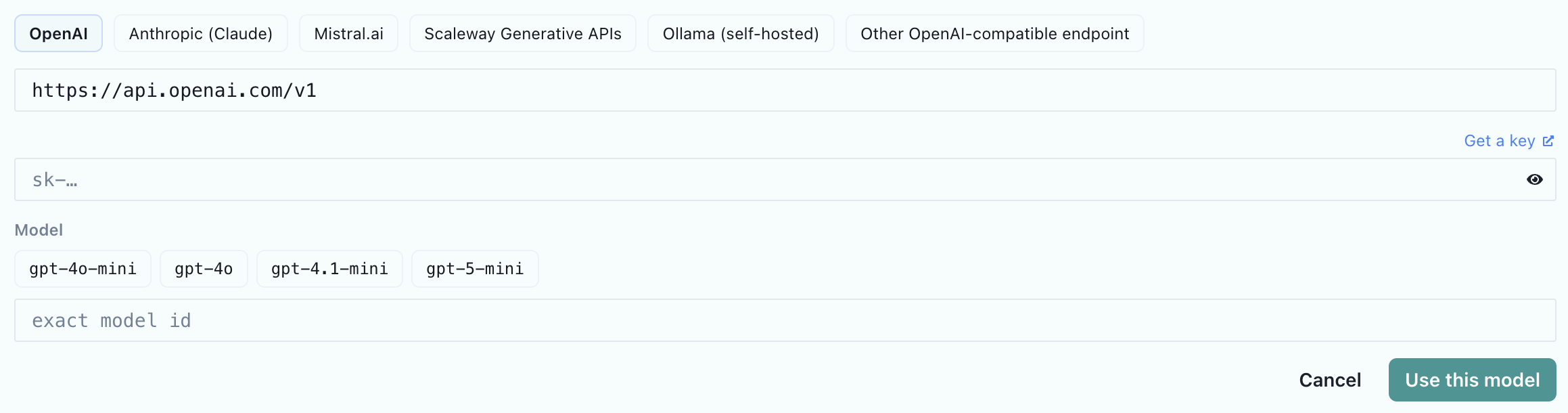
- Open the AI Model page and select Custom mode.
- On the capability you want (e.g. Chat), click "Use my own API key".
- Pick your provider, paste your API key, and choose the model — recommended models are suggested, or enter an exact model id.
- Save. AI SmartTalk verifies the connection, then routes that capability through your key. The capability shows a YOUR KEY badge.
You can do this for one capability or all of them, and mix with platform models for the rest.
Manage your keys
- Your keys are saved at the organization level and shared across every chatbot in your organization — enter a key once, reuse it everywhere.
- Click "Manage keys" to add a key, register more models under it, rename, or delete it.
- Use Test connection to confirm a key works — no tokens are consumed.
- To stop using your key for a capability, remove it (the × next to the model) — that capability reverts to the platform model automatically.
What happens to billing
Capabilities routed through your key appear in your usage analytics marked BYOK with 0 credits. Capabilities still on platform models are billed normally — BYOK is per capability, so using your own chat model does not make your embeddings or vision free.
Switching back to a preset
Selecting Sovereign or OpenAI mode clears any active BYOK routing first, so the preset's promise holds (e.g. Sovereign stays 100% EU). Your saved keys are kept — they're just no longer routing traffic until you re-enable them in Custom mode.
Data sovereignty
Sovereign mode (and any sovereign model picked in Custom mode) keeps processing inside the EU, on infrastructure in France — no US data transfers. BYOK is opt-in per capability, so you stay in full control of where each type of call goes. See Compliance & Hosting for details.
Related
- Configuration overview — the map of every customization surface
- Knowledge Base — the documents and sources your assistant draws from
- AI Capabilities — how the multi-layer AI pipeline works