Bildirimler
Hiçbir önemli anı kaçırmayın. Önemli bir şey olduğunda — yeni bir müşteri mesajı, bir form gönderimi, bir randevu rezervasyonu veya önemsediğiniz başka bir şey — anında bildirim alın.
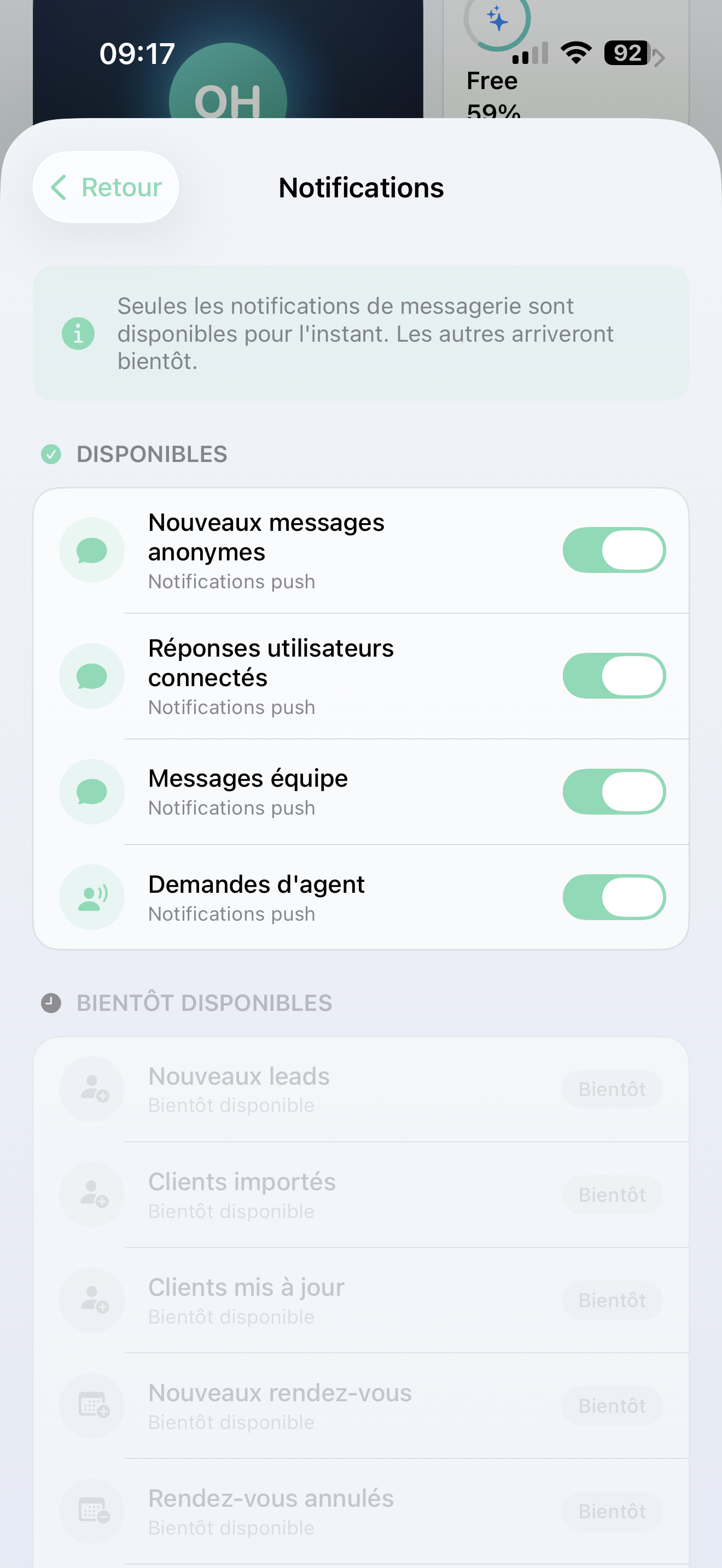
Bildirimleri açma
Uygulamayı ilk açtığınızda, iPhone'unuz bildirimlere izin vermek isteyip istemediğinizi soracaktır. İzin Ver butonuna dokunun — bu, müşterilerin size ihtiyaç duyduğunda haberdar olmanızı sağlayacak.
İsteği kaçırdınız mı? iPhone Ayarları > AI SmartTalk > Bildirimler bölümüne gidin ve bildirimleri açın.
Hangi konularda bildirim alabilirsiniz
Müşteri mesajları
- Web sitesi ziyaretçisinden yeni mesaj
- Tekrar eden bir müşteriden yanıt
- İç ekip mesajı
- Müşterinin bir insanla konuşma talebi
Randevular
- Yeni rezervasyon
- İptal
- Hatırlatma
- Yeniden planlanan randevu
İş faaliyetleri
- Yeni potansiyel müşteri yakalandı
- Form gönderildi (SmartForm)
- Olumlu veya olumsuz geri bildirim
Hesap & sistem
- Ödeme işlendi veya başarısız oldu
- Ekip daveti kabul edildi
- Bilgi tabanı güncellendi
Sizin için önemli olanı seçin
Her şeyi almak zorunda değilsiniz. Bildirimlerinizi özelleştirin:
- Ana ekrandaki Profil bölümüne gidin
- Bildirim Ayarları'na dokunun
- Her türü açıp kapatın
- Kaydet'e dokunun
Buna ayrıca gelen kutusundaki çan simgesi üzerinden de erişebilirsiniz.
Müşteri mesajları ve ajan talepleri bildirimlerini açık tutmanızı öneririz — bu, birinin yanıt beklediği bildirimlerdir.
Birden fazla AI asistanı mı var?
Birden fazla asistan yönetiyorsanız (bkz. Çoklu Hesap):
- Tüm asistanlarınız için bildirim alırsınız
- Her bildirim, hangi asistanla ilgili olduğunu gösterir (örneğin, "[Camille] Yeni mesaj")
- Bir bildirime dokunmak, sizi otomatik olarak doğru hesaba geçirir
Sorun Giderme
Bildirim almıyor musunuz?
- iPhone Ayarları > AI SmartTalk > Bildirimler bölümünün açık olduğunu kontrol edin
- Uygulama içi bildirim ayarlarınızı kontrol edin (Profil > Bildirim Ayarları)
- Telefonunuzun internet erişimi olduğundan emin olun
- Çıkış yapıp tekrar giriş yapmayı deneyin
Bildirimler geç mi geliyor?
- Düşük Güç Modu'nu kapatın
- AI SmartTalk için Arka Plan Uygulama Yenilemenin açık olduğundan emin olun