Chat Service Override
Replace the default AI chat behavior for a specific channel with your custom flow.
Video tutorial
Make your AI agent ACT · SmartFlow basics
When to Use
Use this trigger when you want to fully customize how your AI handles messages on a specific channel:
- Add typing indicators on Messenger/Instagram
- Mark messages as read before responding
- Pre-process messages before AI responds
- Route VIP customers differently
- Add custom integrations before responding
- Implement channel-specific logic
Configuration
| Field | Description |
|---|---|
| Channel | Select which channel to override |
Available Channels
| Channel | Description |
|---|---|
| Messenger | Facebook Messenger |
| WhatsApp Business | |
| Instagram Direct | |
| Discord | Discord bot |
| Slack | Slack workspace |
| Gmail | Gmail integration |
| SMTP email | |
| Web | Web chatbot (WordPress, PrestaShop, Joomla, etc.) |
Available Variables
When your flow runs, you have access to:
| Variable | Description |
|---|---|
{{message.content}} | User's message text |
{{message.type}} | Message type (text, image, etc.) |
{{user.name}} | User's display name |
{{user.email}} | User's email (if available) |
{{conversation.id}} | Conversation ID |
{{channel}} | Channel name |
Example: Professional Messenger Experience
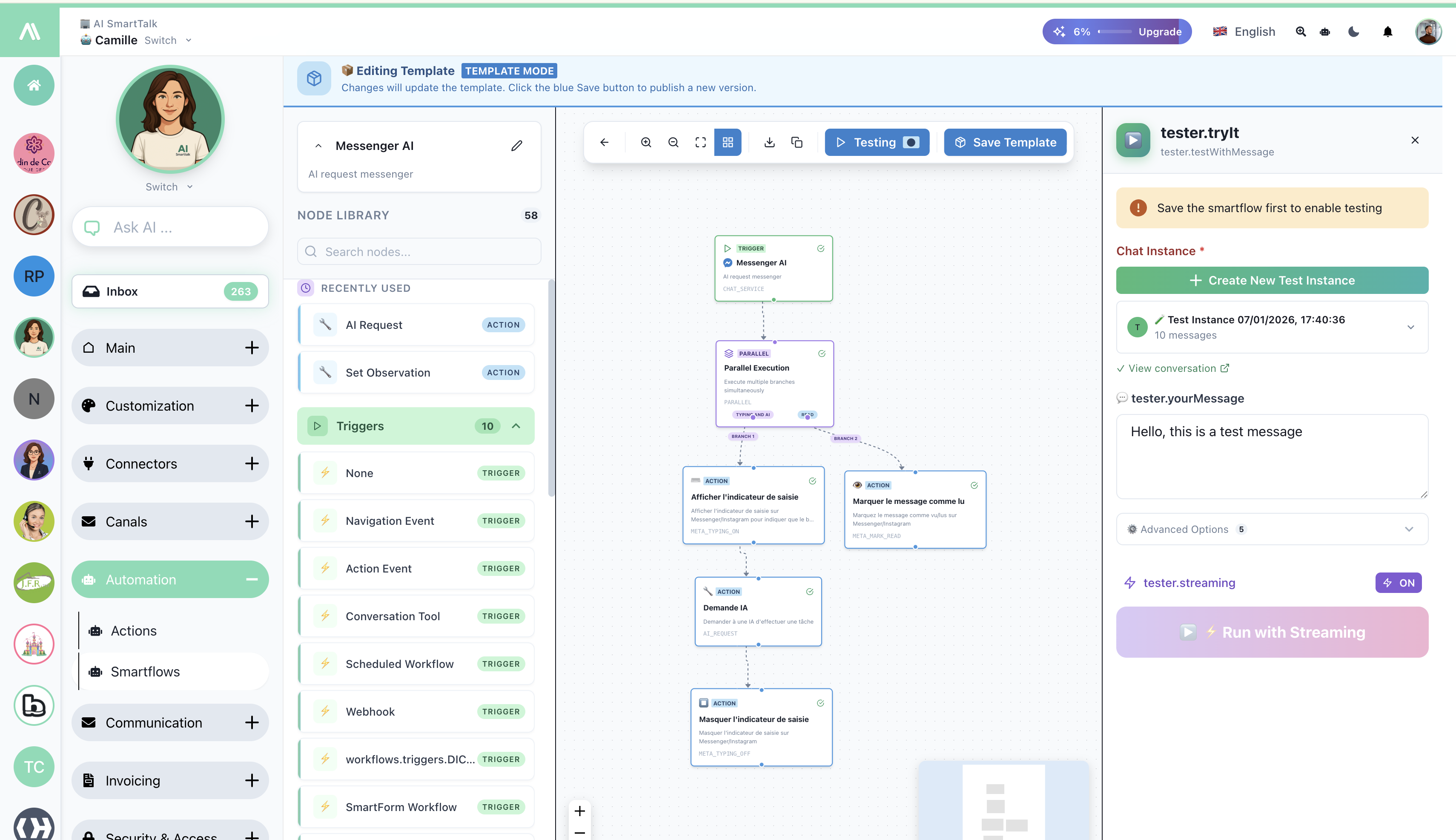
The screenshot above shows a typical Messenger override flow:
Flow Structure
- Messenger AI (Trigger) — Chat Service Override for Messenger
- Parallel Execution — Run multiple actions simultaneously:
- Show Typing Indicator — User sees "typing..."
- Mark Message as Read — Blue checkmarks appear
- AI Request — Process the message with AI
- Hide Typing Indicator — Remove typing indicator
- Send Message — Reply to user
Why Parallel Execution?
Running "Show Typing" and "Mark as Read" in parallel:
- Provides instant feedback to user
- Makes your bot feel responsive and professional
- Both actions complete before AI processing begins
Example: Gmail with Draft Creation
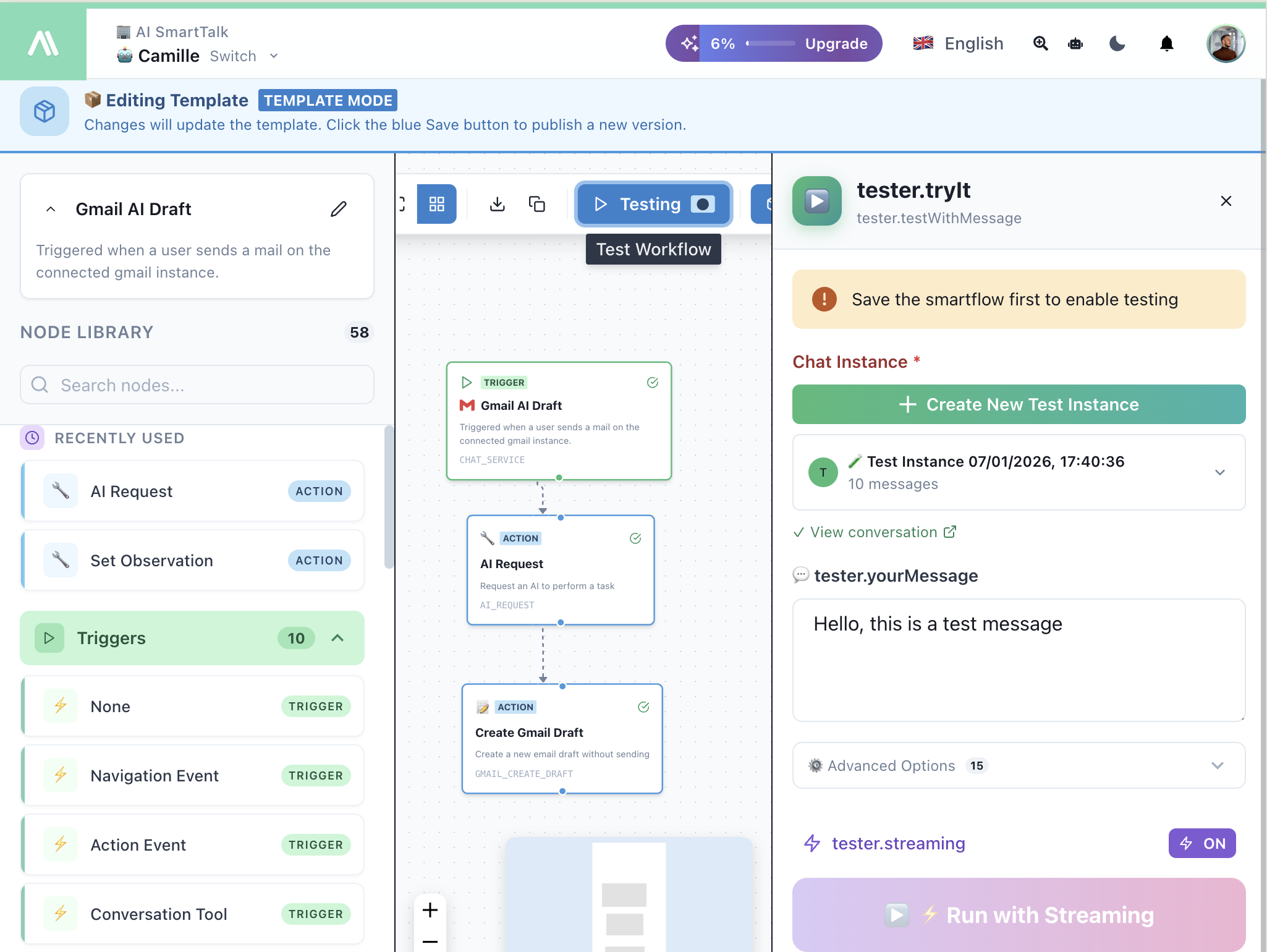
Override Gmail to create drafts instead of auto-replying:
- Gmail AI Draft (Trigger) — Chat Service Override for Gmail
- AI Request — Generate a response
- Create Gmail Draft — Save as draft for human review
Testing
Use the test panel to simulate messages on your channel:
| Element | Description |
|---|---|
| Chat Instance | Create or select a test conversation |
| tester.yourMessage | Input a test message |
| Run with Streaming | Watch your flow execute in real-time |
Related
- Conversation Tool — AI-triggered flows
- Meta Typing On — Show typing indicator
- Meta Typing Off — Hide typing indicator
- Meta Mark Read — Mark as read
- Parallel Execution — Run actions simultaneously