Conversation Tool
Create a tool that the AI can use during conversations. The AI decides when to call it based on context.
Make your AI agent ACT · build your first Tool
When to Use
Use this trigger to extend what your AI can do:
- Search for products in your catalog
- Check order status in your system
- Look up customer data in CRM
- Create support tickets in JIRA
- Book appointments
- Any custom capability
Configuration
Basic Settings
| Field | Description |
|---|---|
| Tool Name | Human-readable name (shown in Node Library) |
| Description | Explains when/how AI should use this tool |
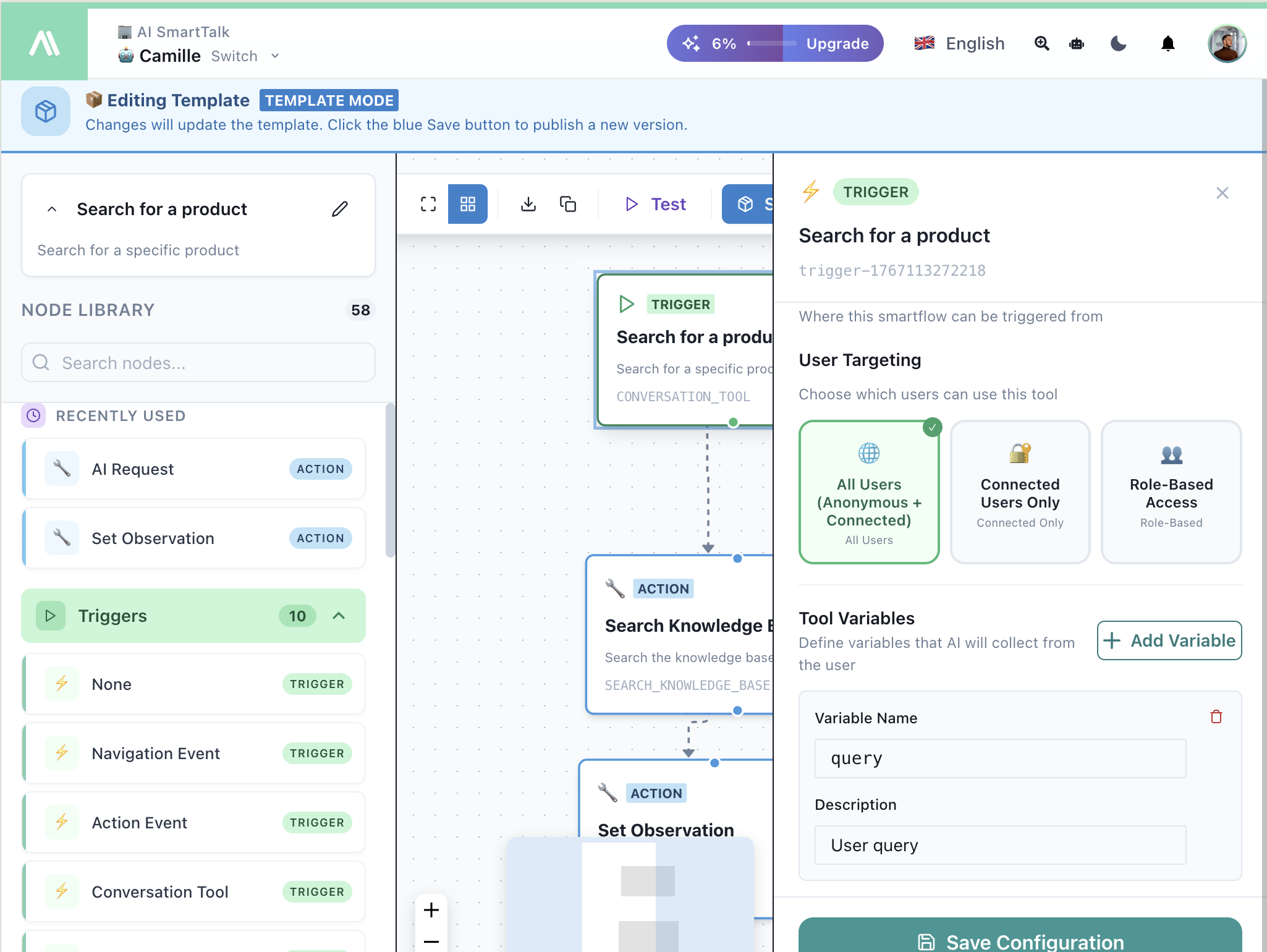
User Targeting
Choose who can use this tool:
| Option | Description |
|---|---|
| All Users | Anonymous + connected users |
| Connected Users Only | Only logged-in users |
| Role-Based Access | Specific user roles |
Tool Variables
Define parameters the AI needs to collect from the user:
| Field | Description |
|---|---|
| Variable Name | Internal name (e.g., query, orderId) |
| Description | Help AI understand what to ask for |
Variables become available as {{variableName}} in your flow.
How It Works
- You define a tool with name, description, and variables
- AI learns when to use it from your description
- User asks something related (e.g., "Find me a laptop")
- AI collects required variables conversationally
- Flow runs with the collected data
- Result returns to AI for the final response
Naming Your Tools: Why It Matters
When your AI assistant has access to multiple tools, it chooses which one to call based on three things only: the tool name, the tool description, and the variable descriptions. It cannot see what's inside the flow — it reads text and decides.
If those three fields are vague or too similar across tools, the AI will pick the wrong tool. Studies on LLM function calling show that improving description clarity alone can increase correct tool selection by 15–20 percentage points, without changing the underlying model.
This is especially critical when you have several tools that search different knowledge bases — from the AI's perspective, they all "search for information." The name and description are the only way it can tell them apart.
Tool Name
Use the pattern domain_action_target so the name alone distinguishes each tool:
| ❌ Vague | ✅ Clear |
|---|---|
Search | rgpd_legal_analysis |
search_docs | ecommerce_product_search |
Tool 2 | support_ticket_lookup |
The AI uses the name as a first filter before reading the description. A clear name lets it shortlist instantly; a generic name forces it to guess.
Tool Description
The description is your most powerful lever. Use this formula:
[What it does — 1 sentence]
Use for: [3–5 concrete use cases with the words your users would actually say]
❌ Bad:
Search the knowledge base for information.
✅ Good:
Searches CNIL sanctions and CJUE case law.
Use for: finding penalty decisions by sector or violation type,
looking up fine amounts, citing legal precedents,
assessing the financial risk of RGPD non-compliance.
The words inside "Use for" act as semantic triggers. When a user's message contains "fine", "penalty", or "risk", the AI immediately matches it to this tool.
Variable Descriptions
A variable described as "The search query" tells the AI nothing. It will paste the user's raw question every time. A better description guides the AI to extract the right keywords before sending them.
| ❌ Vague | ✅ Clear |
|---|---|
The search query | Search query: violation type, company name, sector, fine amount, or legal concept |
User input | Document type requested: template, model, form, clause, or contract |
This pushes the AI to reformulate instead of copying the user's entire message — resulting in more targeted searches and better results.
Avoiding Tool Conflicts
When two tools can answer the same question, the AI hesitates — and sometimes picks randomly. Each tool must cover an exclusive territory.
The rule: if you can think of a user question that could go to either tool, your descriptions need more precision.
Example — 5 compliance tools with clear boundaries:
| Tool | Covers | Does NOT cover |
|---|---|---|
compliance_legal_analysis | Law articles, legal obligations, rights | No practical advice, no real-world cases |
compliance_methodology | Step-by-step guides, audit procedures, frameworks | No legal text, no templates |
compliance_document_templates | Ready-to-use models, forms, contract clauses | No methodology, no legal analysis |
compliance_business_processes | Operational workflows, approval circuits | No legal text, only internal processes |
compliance_operational_solutions | Concrete fixes, technical recommendations | No theory, only actionable solutions |
The more specific each description is about what the tool covers, the less ambiguity there is. You don't need to write explicit exclusions — precision does the work.
Quick Checklist
Before publishing a flow with a Conversation Tool trigger, verify:
- Name follows
domain_action_target— distinguishable without reading the description - Description starts with what the tool does in 1 sentence
- Description includes "Use for:" with 3–5 concrete use cases
- Variable descriptions list the types of information expected, not just "the query"
- No overlap with another tool's territory
- Tested with 2–3 ambiguous questions in the Test panel to confirm correct routing
Example: Product Search
Tool Configuration:
- Name:
ecommerce_product_search - Description: Searches the product catalog by name, category, or feature. Use for: finding a specific product, comparing products in a category, checking if a product exists, looking up product specs or pricing.
- Variable:
query— "Product name, category, feature, or price range to search for"
Flow:
- Trigger: Conversation Tool
- Action: Search Knowledge Base (
{{query}}) - Action: Set Observation (return results)
User conversation:
User: "Do you have any wireless headphones?"
AI: calls ecommerce_product_search with query="wireless headphones"
AI: "Yes! I found 3 wireless headphones. The Sony WH-1000XM5 is our bestseller at €349..."
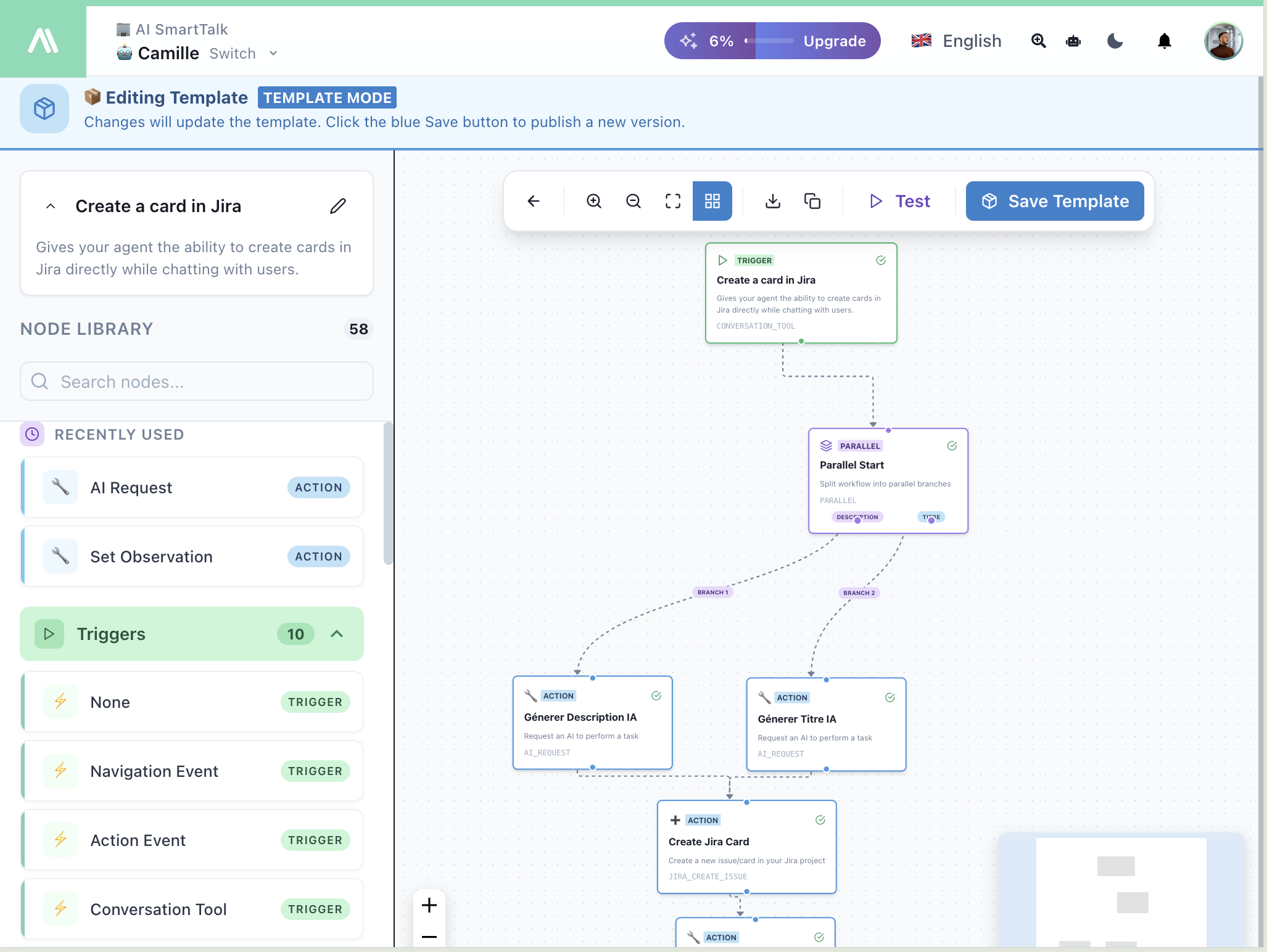
Example: JIRA Ticket
Tool Configuration:
- Name:
support_create_jira_ticket - Description: Creates a JIRA support ticket from the conversation. Use for: when the user reports a bug, requests a feature, or needs to escalate an issue to the technical team.
- Variables:
title— "Short summary of the issue (1 sentence)",description— "Detailed description including steps to reproduce, expected behavior, and actual behavior"
Flow:
- Trigger: Conversation Tool
- Action: AI Request (generate title/description)
- Parallel: Generate description + title
- Action: JIRA Create Issue